
Last updated on May 17th, 2026 at 04:58 pm
Most “loudest mechanical keyboard” lists get something fundamentally wrong. I’ve seen articles recommending Cherry MX Silver speed switches as a top pick for loud typing Silver switches are designed for fast actuation, not volume. That kind of mistake tells you the list was put together without much hands-on knowledge of how keyboard sound actually works.
So before we get into the picks, here’s what actually matters: the loudness of a keyboard lives almost entirely in its switch mechanism, not the keyboard brand, the RGB lighting, or how “gaming” it looks. There are two types of clicky switches click-jacket and click-bar and the difference between them is the difference between a decent click and a switch that genuinely makes people turn their heads across the room. Once you understand that distinction, you’ll never look at a keyboard list the same way again.
The six keyboards in this guide were chosen based on switch mechanism type, community reputation on r/MechanicalKeyboards, and acoustic data from real sound tests. No filler picks, no Speed Silver nonsense. Just the keyboards that are actually, measurably loud and worth your money.
What Makes a Keyboard Actually Loud? (It’s Not What Most Lists Tell You)
The loudness of a mechanical keyboard comes down to one thing: the type of switch inside it. Linear switches are smooth and quiet by design. Tactile switches give you a bump you can feel but not much you can hear. Only clicky switches are engineered to make intentional noise, and even within that category, not all of them are equally loud.
There are two different mechanisms that clicky switches use, and they sound nothing alike.
The first is a click-jacket mechanism, used by Cherry MX Blue and Gateron Blue switches. A small plastic collar snaps against the housing as the stem travels down, producing a high-pitched, slightly rattly click. It’s the classic mechanical keyboard sound most people picture.
The second is a click-bar mechanism, used by Kailh Box White, Box Jade, and Box Navy switches. A thin metal bar flexes and snaps back with each keypress, producing a sharper, cleaner, more forceful snap. It’s louder, more consistent, and carries further across a room.

The click-jacket (left) uses a plastic collar to produce its click. The click-bar (right) uses a flexible metal wire that snaps back with each press which is why it sounds louder and feels more forceful.
To put numbers to it: Cherry MX Blue measures around 65 to 68 decibels during normal typing. Kailh Box Jade hits 70 to 72 decibels. For context, normal conversation sits at around 60 decibels and a membrane keyboard barely reaches 45 to 50. That difference is very noticeable in a real room.
Note: These dB figures represent isolated switch measurements taken at close range in controlled conditions. Real-world board-level volume will be noticeably higher depending on your case material, plate type, and keycaps. In an actual keyboard build, a Box Jade typically measures 78 to 80 dB and a Box Navy reaches 82 to 85 dB at peak.
That comparison alone explains why some switches are built for volume and others simply aren’t.
The switch is only part of the story. The same switch can sound completely different depending on what it’s sitting inside. Think of the keyboard’s body as an acoustic chamber that either amplifies or absorbs what the switch produces.

Every part of a mechanical keyboard affects how it sounds. The switch creates the click, but the keycap, spring, plate, and case all shape the final sound you actually hear.
Case material makes a big difference. Thin plastic resonates easily, making the sound louder but also hollower. Aluminum contains the sound more tightly, giving you a sharper, more focused clack. Polycarbonate lands somewhere in between.
Plate material matters just as much. Steel and brass plates are rigid and transmit vibration efficiently, producing a brighter, louder sound. POM and polycarbonate plates absorb more vibration, resulting in a deeper and quieter tone. For maximum volume, a steel plate paired with a click-bar switch is a hard combination to beat.
Keycaps play a subtler role. Thin ABS keycaps produce a brighter, higher-pitched sound. Thick PBT keycaps produce a deeper clack that most people find more satisfying, even though ABS is technically louder by decibels.
Finally, stabilizers. When the stabilizers under your larger keys are not properly lubed, they add a rattly, scratchy noise on top of everything else. This is why two keyboards with identical switches can sound completely different out of the box. It is one of the most overlooked factors in keyboard acoustics and worth paying attention to when comparing boards. If you want to go deeper on how PCB construction affects sound and feel, our [What are Mechanical Keyboard PCBs?] guide covers it well.
“Loud” vs. “Clicky” vs. “Clacky” vs. “Thocky”: These Are Not the Same Thing
One of the most common points of confusion in the mechanical keyboard world is that people use these four words interchangeably. They are not the same thing, and mixing them up can lead you to buy a keyboard that sounds nothing like what you actually wanted.
Here is what each one actually means.

Loud describes volume. Clicky, clacky, and thocky describe sound character. These are four different things, and knowing the difference will help you buy the right keyboard the first time.
Loud is straightforward. It refers to raw volume, measured in decibels. A keyboard can be loud in any number of ways. A deep thocky keyboard can be loud. A sharp clicky keyboard can be loud. Loudness describes how much sound is produced, not what kind.
Clicky refers to a specific sound character. It is a sharp, high-pitched acoustic event that happens at the actuation point of the switch. This is the sound associated with click-jacket switches like Cherry MX Blue and Gateron Blue. It has a slight rattle to it and some people find it a little harsh after extended typing sessions. It is the sound most people picture when they think of a mechanical keyboard.
Clacky is a step up in both volume and physicality. It is a louder, more percussive snap that comes from click-bar switches like Kailh Box Jade and Box Navy. It is cleaner than clicky, more tactile, and hits harder. If clicky is the sound of a typewriter, clacky is the sound of someone who means business.
Thocky is where a lot of people get confused. Thock is not a loud sound. It is a deep, resonant, low-frequency sound that happens on the downstroke when a key bottoms out. It is associated with premium gasket-mount keyboards, POM plates, and heavier linear or tactile switches. Thock is entirely about sound quality, not volume. A thocky keyboard can actually be quite quiet. Chasing thock and chasing loudness are two completely different goals.
The practical takeaway is simple. If you want a keyboard that is genuinely loud and fills the room, you want clicky or clacky. If you want something that sounds satisfying and premium without being ear-piercing, you might actually be looking for thocky rather than loud. Knowing the difference before you buy will save you from a purchase you regret.
If you want to go deeper on what thock actually means and why so many enthusiasts chase it, we have a full explainer on [What Does “Thock” Mean?] that breaks it down properly.
Who Actually Wants a Loud Keyboard? (And Whether You Are One of Them)
Before you commit to the loudest switch on the market, it is worth being honest about your actual situation. A loud keyboard is genuinely great in some contexts and a real problem in others. Here is a straightforward breakdown.
It depends on how you game. If you play casually, solo, or mostly single-player games, a loud clicky keyboard is perfectly fine and can actually make the experience more enjoyable.
If you play competitively with teammates on voice chat, it is a different story. Your microphone will pick up every keypress and your teammates will hear it constantly. Beyond the social issue, clicky switches also have a subtle performance consideration worth knowing: the audible click happens slightly before full actuation, which can make the feedback feel a little deceptive during fast inputs. Most serious competitive players stick to linear switches for this reason.
For a deeper look at which switches actually perform best in gaming, check out our guide to the [Best Keyboard Switches for Gaming].
Verdict: Great for casual and solo gaming. A liability in competitive voice-chat settings.
This is the group that benefits most from a loud keyboard. The combination of tactile feedback and audible confirmation genuinely helps with typing rhythm, and many people find it reduces small errors because each keypress feels deliberate and registered.
There is also a psychological element that is hard to dismiss. A lot of writers find that the sound of a loud keyboard puts them in a focused, productive headspace. The typewriter comparison is a cliche at this point but it exists for a reason.
If you type for long sessions in a private workspace, a loud keyboard is one of the best investments you can make for your setup. Some users also find that tactile feedback improves their speed over time, which we cover in our guide on [How to Type Faster and Increase Your WPM].Verdict: The best possible use case for a loud keyboard. Highly recommended.
Loud keyboards have become a deliberate aesthetic choice in streaming and content creation. The ASMR-like quality of a clicky or clacky keyboard is genuinely popular with audiences, and switches like Kailh Box Jade and Box Navy show up constantly in keyboard sound test videos for exactly this reason.
The one thing to get right is your audio setup. Without a directional microphone and proper gain staging, the keyboard will dominate your audio mix and make your voice harder to hear. Sort that out first and a loud keyboard becomes a real asset for your stream.
Verdict: Excellent choice as long as your microphone setup can handle it.
Honestly, do not. Even a Cherry MX Blue in a quiet open office will earn you some unfriendly looks within the first week. A Box Jade or Box Navy in that environment is a different level of problem entirely.
If you work from home alone, none of this applies and you can go as loud as you want. If you are in a shared space, the considerate move is to keep a quieter keyboard for the office and save the loud one for home. Your coworkers will appreciate it more than you might expect.
Verdict: Not recommended for shared workspaces. Perfect for home use with no one around to complain.
The 6 Loudest Keyboard and Switch Combinations You Can Buy in 2026
The 6 Loudest Keyboard Builds, Reviewed
Keychron V1 + Kailh Box Crystal Jade
“The Nuclear Option” Maximum raw dB output from a purchasable combo
✅ Hot-Swappable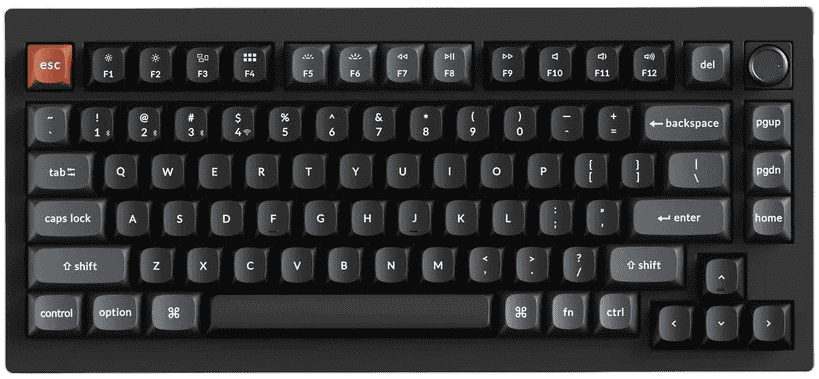
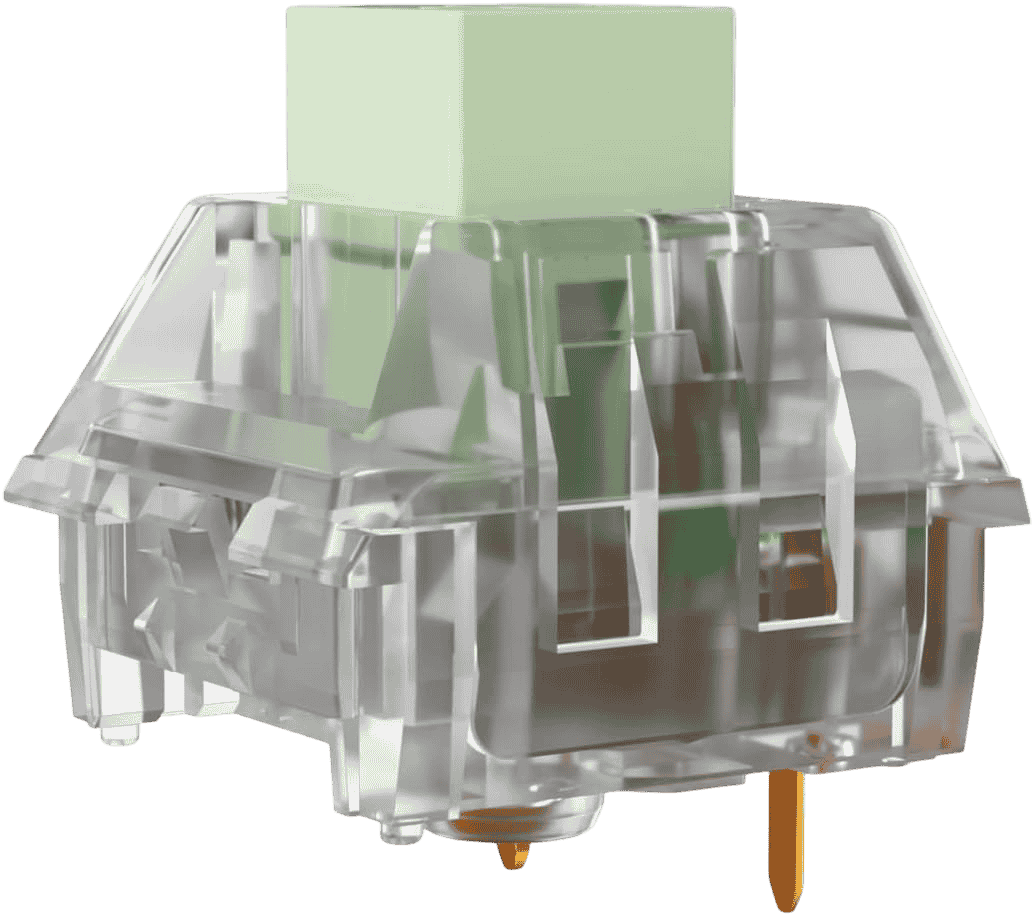
If you want the loudest keyboard build you can put together from products available on Amazon right now, this is it. The Kailh Box Crystal Jade is the loudest production mechanical switch ever measured by the community, hitting around 91 dBA at 10cm during aggressive typing. That is louder than a vacuum cleaner at close range. Pair it with the Keychron V1 and you have a combination that was essentially engineered by the keyboard community itself to produce maximum volume.
The reason this pairing works so well comes down to a principle enthusiasts on r/MechanicalKeyboards have documented repeatedly: plastic cases amplify clicky switches more than aluminum ones. The Keychron V1 uses a tray-mount ABS plastic construction with a steel plate. There is no gasket mount to absorb the impact, no heavy aluminum body to contain the vibration. Every Crystal Jade keystroke transfers directly from the steel plate into the plastic shell and radiates outward into the room. The V1 also ships with a removable internal silicone dampening mat. Take that out and the case becomes a near-perfect echo chamber for the Crystal Jade’s explosive click-bar snap.
The Crystal Jade itself uses the same thick click-bar mechanism as the standard Box Jade and Box Navy, but with a fully transparent polycarbonate housing instead of the standard nylon and polycarbonate hybrid. That housing resonates more aggressively, which is why it measures around 6 dB louder than a regular Box Jade. The actuation force sits at 55g with a 75g bottom-out, which is heavy enough to feel deliberate without being as fatiguing as the Box Navy’s 90g bottom-out. The click happens on both the downstroke and upstroke, creating a sharp double-snap at normal typing speed that enthusiasts describe as addictively clicky.
The Keychron V1 itself is a strong platform for this build. It is a 75% layout with 81 keys, hot-swappable 5-pin Kailh sockets that accept the Crystal Jade directly, full QMK and VIA support, and RGB backlighting. The combined cost of the keyboard and a 110-pack of Crystal Jade switches puts this build in the budget to mid range, which makes it the most affordable genuinely extreme loud build on this entire list.
One honest thing to set expectations on: this combination is not for everyone. The 75g bottom-out force means extended typing sessions will fatigue your fingers if you are not used to heavier switches. The sound at peak typing speed is genuinely room-filling and will carry through walls. Community members on r/MechanicalKeyboards have called Crystal Jade switches “just too loud for me” while simultaneously recommending them to anyone asking for maximum volume. That is a fair summary of what you are getting into.
If you want to go deeper on how hot-swap keyboards work and how easy the switch installation actually is, our guide on [How to Install Switches on Hot-Swap Keyboards] walks through the full process step by step.
-
Loudest keyboard and switch combination currently available
-
Plastic tray-mount case amplifies the Crystal Jade click naturally
-
Removing the stock silicone mat adds even more volume at zero cost
-
Hot-swappable so you can change switches later without soldering
-
Full QMK and VIA support for complete key remapping
-
Crystal Jade switches may need a separate order as stock varies
-
Not ideal for competitive gaming due to click-bar double-actuation feel
GMMK 3 Pro (75%) + Kailh Box Navy
“The Signature Enthusiast Build” Deep, heavy clicks that resonate through aluminum
✅ Hot-Swappable (5-pin)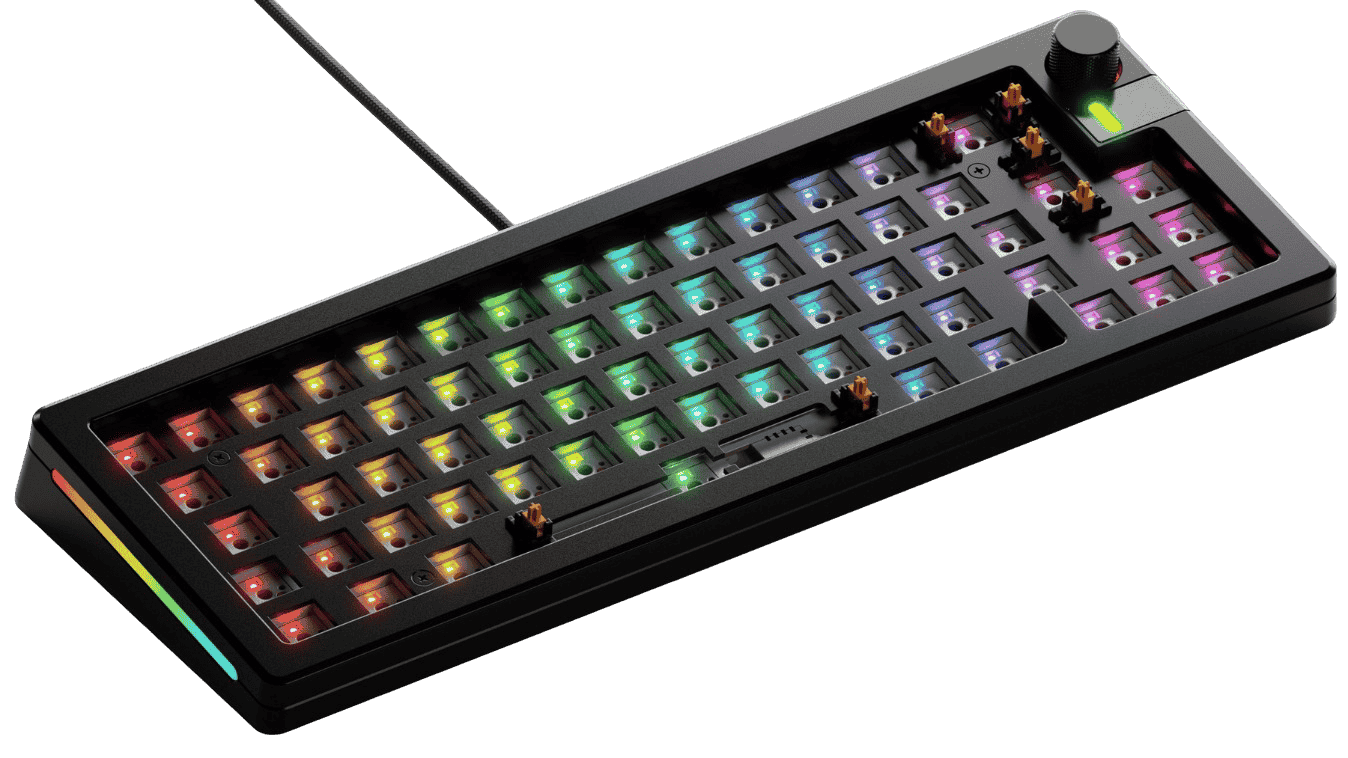
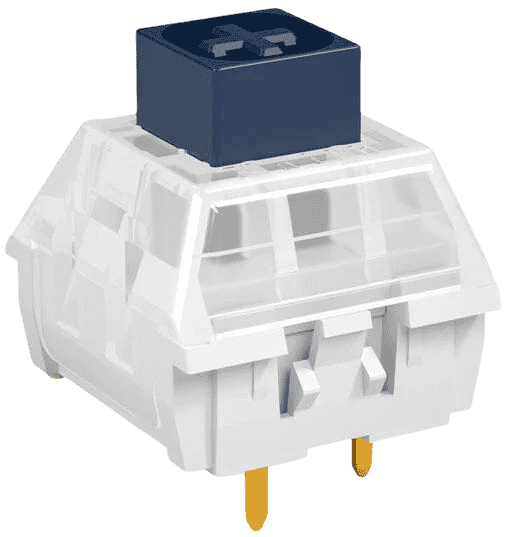
If the Crystal Jade build is the loudest thing on this list, the GMMK 3 Pro with Box Navy switches is the most satisfying. This is the combination that enthusiasts on r/MechanicalKeyboards point to when someone asks for a loud keyboard that also sounds genuinely premium. It is not just loud for the sake of loud. It is loud in a way that feels deliberate, controlled, and deeply satisfying with every keystroke.
The Box Navy is a thick click-bar switch with a 60g actuation force and a 90g bottom-out. That heavy spring weight is what separates it from the Box Jade. Where the Jade produces an explosive, sharp snap, the Navy produces something deeper and more physical. Community members describe it as the “bass guitar” to the Jade’s “electric guitar.” Every keypress feels like a committed, intentional act. At around 85 dBA peak, it is the second loudest switch on this list and it sits comfortably above anything a click-jacket switch like Cherry MX Blue can produce.
The GMMK 3 Pro brings something genuinely interesting to this pairing. Its full CNC aluminum body creates a unique acoustic effect where the Navy’s deep click resonates through the case and produces a brief metallic ring after each keystroke. That ring gives the sound a premium, authoritative character that plastic cases simply cannot replicate. The modular gasket system also works in your favor here. Removing the gaskets stiffens the typing platform and increases vibration transfer, which pushes the volume up noticeably without any switch changes. It is one of the few keyboards on this list where you can tune the loudness after purchase just by adjusting the internal construction.
The GMMK 3 Pro is a barebones keyboard, meaning it ships without switches or keycaps. That is actually a feature rather than a drawback for this build because it means the Box Navy switches drop straight in without replacing anything pre-installed. The 5-pin hot-swap sockets accept the 3-pin Box Navy directly. You will need to source your own keycaps separately, which adds to the total cost but also gives you full control over the sound profile since keycap material affects the final sound character as covered earlier in this article.
One honest downside worth flagging is the Box Navy’s spring weight. The 90g bottom-out is genuinely heavy. Most typists report noticeable finger fatigue after two or more hours of continuous typing. This is not the switch for someone who types all day. It is the switch for someone who wants maximum impact and can live with taking breaks.
-
Box Navy delivers the deepest, most physical click on this list
-
Aluminum case adds a premium metallic ring to every keystroke
-
Modular gaskets let you tune loudness after purchase
-
Box Navy switches drop straight in with no pre-installed switches to remove
-
Widely respected combination across the enthusiast community
-
No keycaps included so you need to budget for those separately
-
Aluminum contains sound more than plastic so raw volume sits below the V1 build
Keychron Q1 Pro + Kailh Box Jade
“The Sweet Spot” Explosive clickbar meets premium aluminum acoustics
✅ Hot-Swappable (5-pin)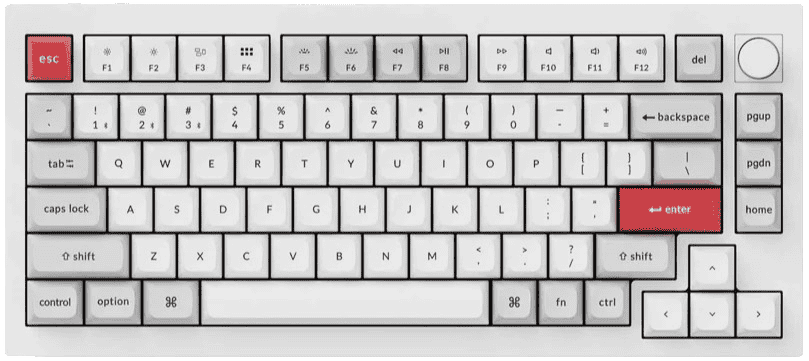
If you want a keyboard that is genuinely loud, built to a premium standard, and wireless capable all at the same time, the Keychron Q1 Pro with Box Jade switches is the answer. This is the combination that sits at the intersection of everything. It is not the absolute loudest build on this list, but it delivers the best balance of volume, sound quality, build quality, and everyday usability of any combination here.
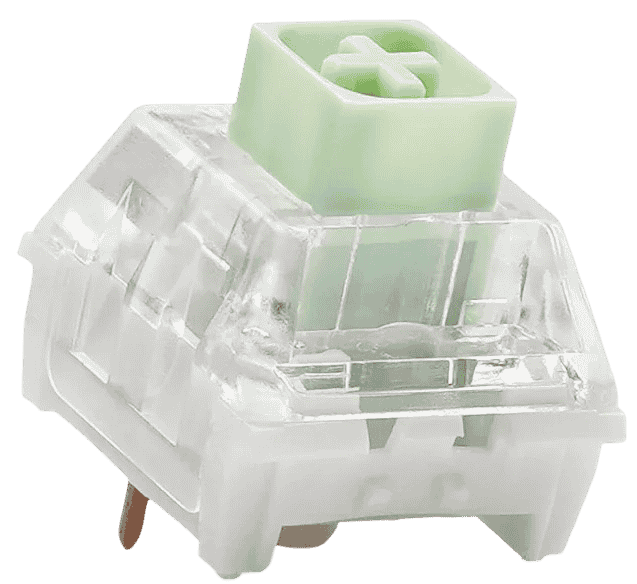
The Box Jade is the community’s most recommended loud switch for a reason. It uses the same thick click-bar mechanism as the Box Navy but with a lighter 50g actuation force and a 70g bottom-out. That lighter spring weight makes it significantly more approachable for long typing sessions while still producing an explosive, full-bodied snap that measures around 78 to 80 dBA at peak. Enthusiasts consistently describe it as the loudest switch they can actually type on comfortably for extended periods, which puts it in a different category from the Box Navy’s more demanding spring weight.
The Keychron Q1 Pro is a 75% wireless keyboard built around a full CNC aluminum body that weighs around 2.5 kilograms. That weight is not a flaw, it is a feature. The dense aluminum mass gives the Box Jade’s click a full-bodied, controlled character that lighter plastic boards cannot replicate. Each keystroke produces a sharp snap followed by a subtle resonance through the case that sounds expensive in the best possible way. The double gasket mount adds a slight flex to the typing platform which softens the impact just enough to make the sound richer without killing the volume.
The Q1 Pro is hot-swappable with 5-pin Kailh sockets, so the Box Jade switches install directly with no modifications needed. It supports both Bluetooth 5.1 and wired USB-C which makes it genuinely versatile across different setups. The wireless capability is worth highlighting specifically because most loud keyboard builds on this list are wired only. If you want the freedom to use a loud keyboard at your desk without cable management, this is the only premium option on the list that gives you that.
The main honest downside here is the price. The Q1 Pro plus a pack of Box Jade switches puts this build at the premium end of the list. You are paying for the aluminum construction, the wireless capability, and the Keychron build quality. If budget is a concern, the Monsgeek M1 V5 build at position 4 gives you a similar aluminum plus Box Jade experience at a noticeably lower cost.
-
Box Jade delivers explosive volume without the fatigue of Box Navy
-
Aluminum body gives the Jade click a rich, controlled character
-
The only wireless loud build on this list
-
Double gasket mount adds comfort without killing volume
-
Comfortable enough for long typing sessions
-
Most expensive combination on this list
-
2.5kg weight makes it impractical to carry around
Monsgeek M1 V5 + Kailh Box Jade
“Maximum Loudness Per Dollar” Premium aluminum acoustics at budget prices
✅ Hot-Swappable (5-pin)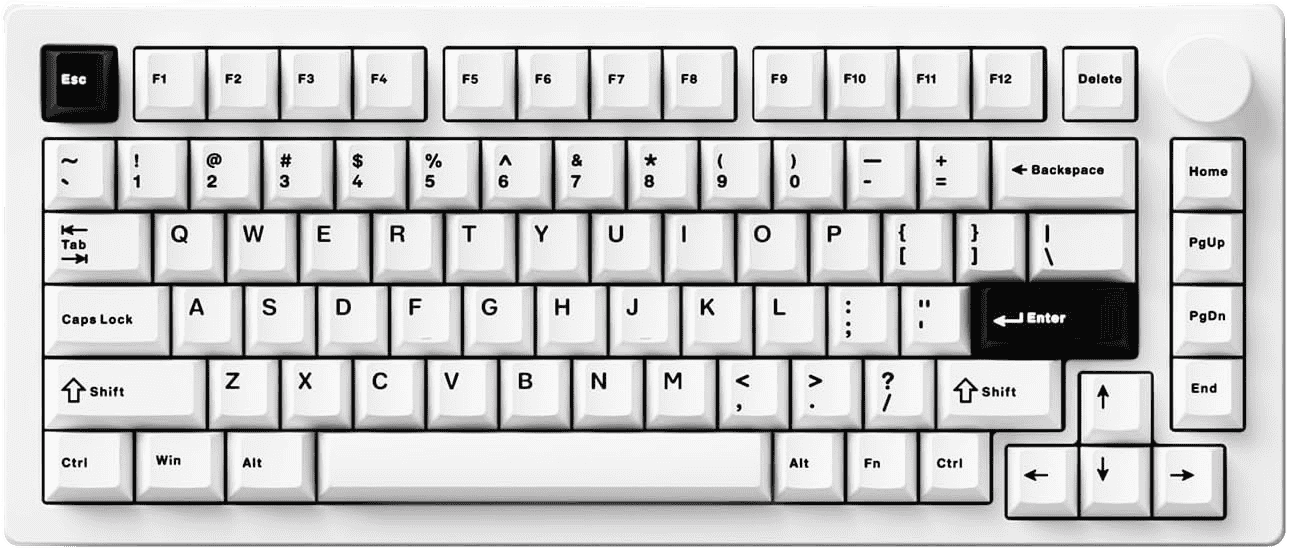
Not everyone wants to spend premium money to get a genuinely loud keyboard. The Monsgeek M1 V5 paired with Kailh Box Jade switches is the answer for anyone who wants the click-bar experience in a proper aluminum build without paying the Keychron Q1 Pro price. This is the combination that delivers the most loudness per dollar on this entire list and it does not cut meaningful corners to get there.
The Box Jade switch is the same one used in position 3. The same thick click-bar mechanism, the same 50g actuation, the same explosive snap that measures around 77 to 79 dBA at peak. What changes between positions 3 and 4 is the keyboard, not the switch. And that difference is worth understanding clearly before you decide which build suits you better.
The Monsgeek M1 V5 is a full aluminum keyboard with VIA support, a gasket mount, and hot-swappable 5-pin sockets that accept Box Jade switches directly. For the price it sits at, the aluminum construction is genuinely remarkable. Most keyboards at this price point use plastic cases with aluminum accents. The M1 V5 uses a proper aluminum body throughout, which gives the Box Jade click the same kind of controlled, resonant character you get from more expensive boards. The gasket mount adds a slight flex that improves typing comfort without noticeably dampening the click volume.
One thing worth being transparent about regarding positions 3 and 4 is the dB overlap. Both builds using Box Jade switches measure in the 77 to 80 dB range at peak. The Q1 Pro earns position 3 not because it is louder by raw decibels but because the heavier aluminum construction and double gasket mount produce a richer, more premium sound character. The M1 V5 at position 4 sounds slightly brighter and less refined by comparison, but to most ears in a real room the volume difference is minimal. If raw loudness is your only priority and budget matters, the M1 V5 is the smarter buy.
The M1 V5 is a wired only keyboard which is worth noting if wireless is important to your setup. It also ships as a barebones unit in some configurations, so verify whether your chosen version includes keycaps before purchasing. VIA support means full key remapping without needing to flash firmware, which is a genuinely useful feature at this price point that not all budget to mid range keyboards offer.
-
Best loudness to price ratio on this entire list
-
Full aluminum construction at a mid range price
-
Box Jade delivers the same click-bar explosion as the Q1 Pro build
-
Gasket mount adds typing comfort without dampening volume
-
VIA support for easy key remapping out of the box
-
Wired only with no wireless option
-
Sound character is slightly less refined than the Q1 Pro build
Keychron C1 Pro 8K (TKL) + Kailh Box Navy
“87 Keys of Plastic Thunder” Tray-mount ABS amplifies Navy clicks to devastating effect
✅ Hot-Swappable (3-pin & 5-pin)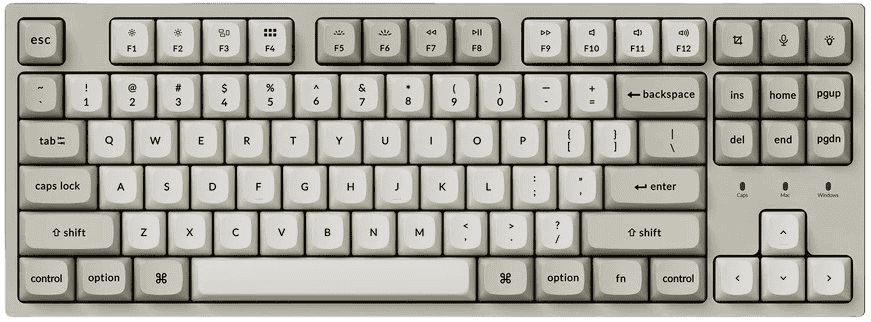
Here is something that surprises a lot of people when they first hear it: the Keychron C1 Pro with Box Navy switches is actually louder in a real room than the GMMK 3 Pro with the same Box Navy switch. The reason comes down to case material and it is exactly what the earlier section on keyboard acoustics explained. Plastic cases amplify and broadcast sound. Aluminum cases contain and refine it. The C1 Pro is ABS plastic with a tray mount and no gasket softening, which turns every Box Navy keystroke into a room-filling event rather than a controlled, focused click.
This is not a theoretical claim. Enthusiasts on r/MechanicalKeyboards have documented this principle repeatedly and specifically recommended the Keychron C series as the ideal platform for maximum loudness builds. The exact community advice reads like a recipe: use a thick click-bar switch, pair it with a large hollow plastic case, remove the internal dampening foam, and the result should be loud enough to hear from another room. The C1 Pro follows that recipe precisely. Its ABS plastic body sits on a tray mount with a steel plate, and the lightweight construction means vibration from each Box Navy press radiates outward freely instead of being absorbed by a heavy metal body.
The Box Navy at position 5 is the same switch used in position 2. The 60g actuation, 90g bottom-out, and thick click-bar mechanism produce the same deep, heavy snap. The difference is purely in how the case handles that snap. Where the GMMK 3 Pro’s aluminum body gives the Navy a refined, authoritative character with a metallic ring, the C1 Pro’s plastic body gives it a thunderous, hollow, room-filling character that is measurably louder at distance. Community dB estimates put this combination at around 83 to 86 dBA during normal to aggressive typing, which actually edges out the GMMK 3 Pro build despite using a less premium chassis.
The C1 Pro ships with pre-installed switches, so the first step with this build is removing the stock switches and installing the Box Navy switches in their place. The keyboard is hot-swappable so no soldering is involved. The process takes around 20 to 30 minutes with a switch puller. The C1 Pro also includes an internal silicone dampening mat and a foam sheet. Removing both before installing the Box Navy switches is the single most impactful modification you can make to this build. It transforms the case from a moderately loud keyboard into a genuine echo chamber.
Beyond the loudness, the C1 Pro 8K brings a feature set that is frankly remarkable for its price point. The 8000Hz polling rate is a specification previously reserved for keyboards costing two to three times more. Full QMK and VIA support means complete key remapping without proprietary software. The TKL layout gives you a full set of arrow keys, function row, and navigation cluster without the bulk of a full size board. At the price it sits at, this is one of the strongest value propositions in the mechanical keyboard market regardless of loudness.
One thing to be honest about is the switch weight. The Box Navy’s 90g bottom-out is the heaviest on this list and it applies equally here as it does in position 2. If you are planning to type for long sessions this switch will fatigue your fingers faster than the Box Jade builds at positions 3 and 4. The loudness payoff is real but it comes with a physical cost that is worth factoring into your decision.
-
Removing stock foam transforms it into a maximum volume echo chamber
-
Box Navy delivers the deepest, most impactful click-bar snap available
-
8000Hz polling rate is exceptional for the price
-
Full QMK and VIA support included
-
Most affordable Box Navy build on this list
-
Requires switch removal and installation before use
-
Plastic case produces a hollow sound character that lacks the refinement of aluminum builds
Redragon K552P (TKL) + OUTEMU Blue
“The Cheap Keyboard Everyone Hears” metal-plated budget chassis + click-jacket blues = aggressively loud value
✅ Hot-Swappable (OUTEMU 3-pin only)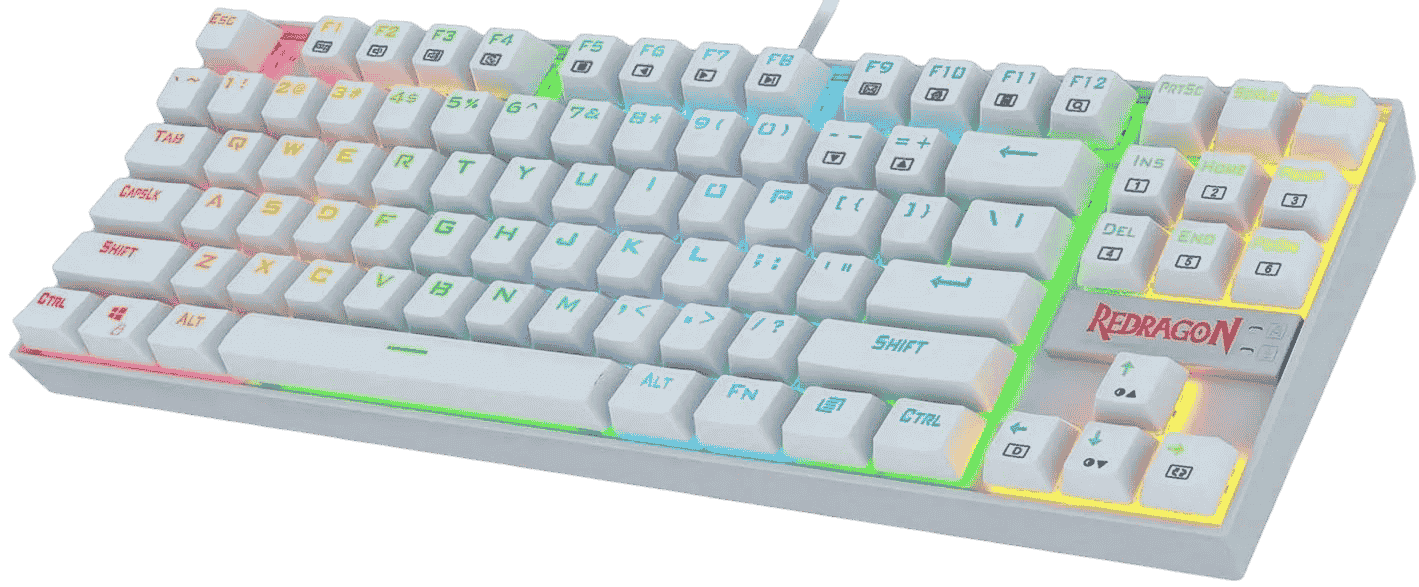
Not every loud keyboard needs to cost a hundred dollars or more. The Redragon K552P paired with OUTEMU Blue switches is the honest answer for anyone who wants a genuinely loud clicky keyboard without spending serious money. The total cost of this combination sits under seventy dollars, making it the most affordable build on this list by a significant margin. And despite the budget price, it is loud enough to annoy everyone in the room, which is exactly what this article is about.
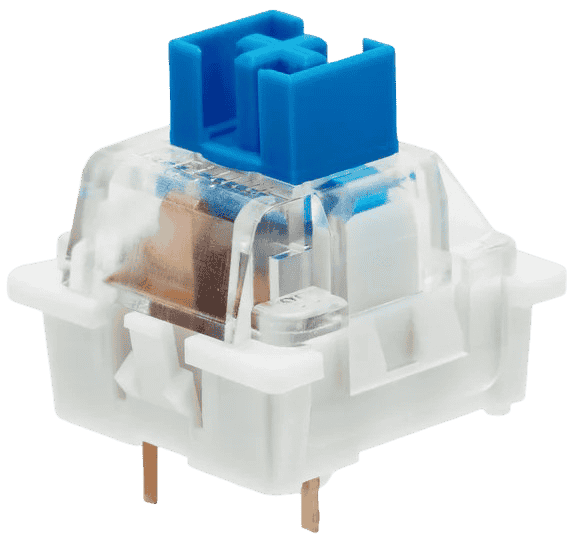
The OUTEMU Blue is a click-jacket switch, which puts it in a different category from the click-bar switches used in positions one through five. As covered in the earlier section on switch mechanisms, click-jacket switches produce a high-pitched, slightly rattly click rather than the sharper, cleaner snap of a click-bar design. The OUTEMU Blue measures around 68 to 79 dBA at peak depending on how hard you type and how much the case amplifies the sound. That is loud enough to be clearly audible across a room and well above what most mainstream gaming keyboards produce. It is not Box Jade or Box Navy territory, but at this price point nothing else comes close.
What makes the Redragon K552P a smart chassis choice for this build is its construction. The keyboard has a metal top plate over an ABS plastic lower shell, which creates an interesting acoustic combination. The metal plate adds a bright, ringy sharpness to each keystroke while the plastic lower body resonates and amplifies the sound outward. The result is a high-pitched, metallic, clicky sound signature that is impossible to mistake for quiet. Enthusiasts who have reviewed the K552 family consistently describe it as loud, pingy, and audible from nearby rooms, which is a reasonable description of what you actually get.
The K552P is hot-swappable but with an important limitation worth being clear about. The hot-swap sockets on this keyboard only accept OUTEMU 3-pin switches. Standard 5-pin switches like Kailh Box Jade or Box Navy will not fit without modification. This means your upgrade path from this keyboard is limited to the OUTEMU switch family rather than the full range of enthusiast switches. If you think you might want to upgrade to click-bar switches later, the Keychron C1 Pro at position 5 is a better long term platform because its sockets accept a wider range of switches.
The OUTEMU Blue switches come in a 109-pack from GranVela on Amazon, which gives you more than enough switches to fill the K552P’s 87-key TKL layout with spares left over. The switch installation is straightforward and takes around fifteen to twenty minutes with a basic switch puller. Stock availability on this pack has been verified as reliable with Prime delivery on Amazon USA.
This build is best understood as a starting point rather than a destination. It gives you the clicky loud keyboard experience at the lowest possible cost of entry, which makes it ideal for anyone who wants to find out whether they actually enjoy loud keyboards before committing to a more expensive build. If you try this combination and find yourself wanting more volume or a cleaner click, the natural upgrade path is any of the click-bar builds higher on this list.
-
Most affordable loud keyboard build on this entire list
-
Metal top plate adds a bright, sharp character to the OUTEMU Blue click
-
Hot-swappable so switch changes require no soldering
-
109-pack gives you plenty of switches with spares
-
TKL layout includes arrow keys and full function row
-
OUTEMU Blue is a click-jacket switch so it lacks the cleaner snap of click-bar alternatives
-
Hot-swap sockets only accept OUTEMU 3-pin switches limiting future upgrades
Can You Make Your Loud Keyboard Even Louder? (Or Tone It Down If You Regret It?)
Once you have your keyboard set up, you might find yourself wanting to push the volume further or pull it back slightly. Both are possible to a degree, but it is worth being honest upfront: if you bought a genuinely loud keyboard with a click-bar switch, you cannot make it truly quiet. You can take the edge off, but the click mechanism itself is permanent. Here is what you can actually do in both directions.
This is the single most impactful change you can make. If your keyboard is hot-swappable and you are currently running a click-jacket switch like Cherry MX Blue or Gateron Blue, swapping to Kailh Box Jade or Box Navy will produce a noticeable and immediate volume increase. The difference between a click-jacket and a click-bar switch in the same keyboard is not subtle. It is the kind of change that makes people in the next room ask what happened. If you have never done a switch swap before, the process itself is straightforward and doesn’t require any soldering.
Many modern keyboards ship with foam inside the case to dampen resonance and improve sound quality. That foam is working against you if loudness is your goal. Removing it turns the keyboard’s internal cavity into a more open resonance chamber that amplifies the switch sound instead of absorbing it. Most keyboards allow foam removal without tools. Check for a layer of foam sitting between the PCB and the bottom of the case and simply lift it out.
If your keyboard supports plate swaps, moving to a steel or brass plate will produce a brighter, sharper, more resonant sound compared to softer plate materials like POM or polycarbonate. Steel and brass are rigid and transmit vibration efficiently, which means more of the switch’s energy reaches the case and gets projected outward. This modification requires more technical confidence than a switch swap but the acoustic difference is real.
Thick PBT keycaps produce a deeper, more muted downstroke sound. Thin ABS keycaps produce a brighter, higher-pitched sound that adds to the overall volume of the keyboard. The difference is subtle compared to changing the switch or removing foam, but if you have already done everything else, keycap material is the last variable worth adjusting.
Before going through these options, one thing needs to be said clearly. You cannot silence a loud clicky keyboard. The click mechanism is a physical part of the switch and no amount of dampening will remove it. These modifications will take the edge off the resonance and secondary noise, but the click itself will still be there. If someone in your household or office is bothered by the sound, a different switch is the only real solution.
This is the cheapest and most effective first step. A thick desk mat absorbs the vibration that travels through your desk surface and into the room. It does not affect the switch sound directly but it reduces the resonance that the keyboard radiates through the desk itself. The difference is noticeable enough that most people feel it is worth doing regardless of whether they are trying to reduce noise.
O-rings are small rubber rings that fit around the keycap stem and cushion the downstroke when the keycap bottoms out against the switch housing. They reduce the thud of bottoming out but they have no effect on the click mechanism itself. This is an important distinction because many people buy O-rings expecting them to silence their clicky keyboard and are disappointed when the click is unchanged. What O-rings actually do is remove a layer of secondary noise on top of the click, which can make the overall sound slightly cleaner and less harsh.
Spring ping is a metallic ringing sound that some switches produce during the upstroke when the spring vibrates inside the housing. It is a separate noise from the click and lubing the springs with a thin lubricant removes it without affecting the click mechanism at all. The result is a cleaner, less chaotic overall sound signature. If your keyboard sounds harsh or tinny on top of the click, spring ping may be part of the reason. Our guide on [How to Lube Mechanical Keyboard Switches] covers exactly how to do this without affecting the click sound.
If you removed foam to make your keyboard louder, adding it back is obviously the reversal. If you never removed it, adding an additional layer of foam between the PCB and the case bottom can reduce overall volume by around 3 to 5 dB. That is a meaningful reduction in perceived loudness without touching the switch itself. It will not make your keyboard office-safe but it will take some of the room-filling resonance out of the sound.
Conclusion
The most important thing this article can leave you with is this: loudness comes from the switch mechanism first and everything else second. The keyboard body, the plate, the keycaps, they all shape the sound, but if the switch does not have a click mechanism built for volume, nothing else will save it.
If you want the absolute loudest experience possible, the Keychron V1 with Crystal Jade switches is the answer. If you want the best balance of loudness and sound quality, the GMMK 3 Pro or Keychron Q1 Pro with Box Jade or Box Navy is where most enthusiasts land. If you just want to find out whether loud keyboards are for you without spending much, the Redragon K552P build gets you there for under seventy dollars.
Pick the build that matches your situation honestly and you will not be disappointed.
Whichever build you land on, the switch is what does the talking, choose it with that in mind.
Frequently Asked Questions
Based on community testing and manufacturer data, the Kailh Box Crystal Jade currently holds that title at around 91 dBA. If you want something slightly more manageable, the Kailh Box Navy sits at around 85 dBA and is the more widely recommended option for people who want extreme loudness without the Crystal Jade’s more aggressive actuation weight.
It depends on how you game. For solo or casual gaming they are perfectly fine and many people enjoy the feedback. For competitive gaming with teammates on voice chat they are a genuine problem since your microphone will pick up every keypress. Most serious competitive players stick to linear switches for this reason.
Probably not fired, but complaints will come faster than you expect. A Cherry MX Blue in a quiet open office is already pushing it. A Box Jade or Box Navy will earn you a visit from a colleague within the first morning. Save the loud keyboard for home use and bring something quieter to the office.
Cherry MX Blue uses a click-jacket mechanism that produces a high-pitched, slightly rattly click at around 65 to 68 dBA. Kailh Box Jade uses a thick click-bar mechanism that produces a sharper, cleaner, more forceful snap at around 78 to 80 dBA. The Box Jade is measurably louder, more consistent, and generally preferred by enthusiasts who have tried both.
Yes, as long as your keyboard is hot-swappable. Swapping from a click-jacket switch like Cherry MX Blue to a click-bar switch like Kailh Box Jade or Box Navy is the single most impactful loudness upgrade you can make.
Not exactly. Loud describes raw volume in decibels. Clicky describes a specific sound character produced by a click-jacket switch mechanism. A keyboard can be clicky without being extremely loud, and a loud keyboard does not have to be clicky. As covered earlier in this article, clacky and thocky are completely different sound profiles that also exist on the loudness spectrum. Knowing the difference helps you buy the right thing the first time.
What does thock mean? We break down the deep, satisfying keyboard sound, how to achieve it, and why it might not be for everyone.

Discover the Best creamy keyboards with silky-smooth switches, luxurious keycaps, and ergonomic designs experience ultra-satisfying, buttery typing every day!
Discover the Best Switches For Mechanical Keyboards to boost typing feel, sound, and durability find your perfect match for every build!
Explore the Best keyboard switches for gaming with lightning-fast actuation, crisp feedback, and durable builds elevate your play and dominate every match!