
Last updated on September 9th, 2026 at 11:46 am
Rapid trigger keyboards have exploded from a niche feature into a full category, with nearly every major brand now shipping a Hall Effect or magnetic switch board built for competitive gaming. That growth is great for choice, but it also means a lot of confusing specs, marketing buzzwords, and boards that claim “0.1mm actuation” without explaining what that actually changes in a match.
We dug through verified specs, actuation testing from trusted reviewers, and community feedback from CS2 and Valorant players to cut through the noise. Below are the picks that consistently held up, organized by what actually matters: raw FPS performance, value, and flexibility for people who also type for a living.
Quick-Pick Comparison Table
Gateron Ultra-Fast Lime (HE)
8,000Hz (wired)
Gateron Double-Rail (HE)
1,000Hz (wireless)**
Gateron Magnetic Jade (HE)
8,000Hz
What Is Rapid Trigger, and Is It Worth It for Gaming?
Rapid trigger is a feature on Hall Effect and magnetic switch keyboards that lets a key reset the instant you start releasing it, instead of waiting for a full return to the top. That means you can re-tap the same key almost immediately. For games built around fast direction changes, that difference is real, not just marketing. If you’re still deciding on a switch family before you even get to rapid trigger, our best keyboard switches for gaming guide is the right place to start first.
It is not a universal upgrade. Whether it is worth paying for depends on what you play, which the rest of this section breaks down.
How Hall Effect / Magnetic Switches Work
Mechanical switches register a press when two metal contacts physically meet, at one fixed point. Hall Effect switches use a magnet in the stem and a sensor that continuously reads its position, giving the keyboard a constant stream of data instead of a single on/off signal. That constant readout is what makes adjustable actuation, rapid trigger, and analog input possible. It also means no physical contact wear, which is why these switches tend to last longer.
Rapid Trigger vs. Adjustable Actuation vs. Snap Tap / SOCD
Adjustable actuation lets you set how far a key travels before it registers, from a hair-trigger 0.1mm to a deeper 2mm+ (more on how actuation force works). This alone doesn’t require rapid trigger.
Rapid trigger builds on that by tracking the key continuously and re-arming the moment you start releasing, rather than waiting for a full reset.
Snap Tap / SOCD / Rapid Tap is unrelated to actuation distance. It handles what happens when you press two opposing keys (like A and D) at once, prioritizing whichever was pressed last instead of canceling both out. As the next section covers, anti-cheat systems treat this very differently than rapid trigger.
Do You Actually Need 8,000Hz Polling?
Polling rate is how often the keyboard reports to your PC per second. 1,000Hz already reports every millisecond; 8,000Hz cuts that gap to about 0.125ms. Most players won’t consciously feel this. It matters most in combination with rapid trigger at very low actuation points, where faster polling detects the release moment slightly sooner. It’s a real spec, just not one that should decide a purchase on its own.
Is Rapid Trigger Cheating? Anti-Cheat, Vanguard, and VAC Safety
Rapid trigger itself is not banned in CS2 or Valorant; adjustable actuation and fast reset are treated as legitimate hardware, not automation.
Snap Tap/SOCD is different, and the two games disagree. Valve banned it in CS2 in August 2024, calling it automation that blurs manual input and scripting, with violations resulting in a match kick. ESL and other tournament organizers followed with their own bans. Valorant currently permits it. The latest VCT ruleset explicitly allows Snap Tap, SOCD, and equivalent tech in pro play unless officials say otherwise. Riot’s Vanguard can detect it at the hardware level but hasn’t banned it. Community consensus treats this as “allowed for now,” not guaranteed to stay that way, so it’s worth double-checking closer to publish. Software-based scripts mimicking either effect are punished far more harshly than hardware in both games.
Who Should Skip Rapid Trigger (and Save $100)
- CS2 competitive players: Snap Tap/SOCD will get you kicked, so part of what these boards offer stays off anyway.
- Slower-paced or non-competitive gamers: the faster reset is unlikely to be noticeable.
- Primarily typing/productivity users: a well-tuned mechanical board will likely feel better for less money.
- Tight budget: adjustable actuation without full rapid trigger captures part of the benefit for much less.
Rapid trigger earns its price for players in fast, twitch-heavy shooters already comfortable with the mechanics it improves. For everyone else, it’s a nice-to-have, not a must-have.
How We Chose These Keyboards
We did not put every board on this list through hands-on lab testing. Instead, we built this list by cross-referencing verified manufacturer specs against independent testing data, professional reviews, and real user feedback, then weighing that against what actually matters for competitive FPS play.
Verified specifications. Actuation range, minimum rapid trigger distance, polling rate, and switch technology were checked directly against manufacturer spec sheets and confirmed listings, not marketing copy alone. Where a brand’s claims looked inflated or unconfirmed, we noted that instead of repeating it as fact.
Independent testing sources. For actuation accuracy, latency, and rapid trigger consistency, we relied on data and hands-on impressions from established reviewers and outlets who do run dedicated test rigs, rather than presenting unverified numbers as our own.
Community and pro-player feedback. Reddit threads, CS2 and Valorant community discussions, and pro-scene equipment choices helped surface real-world reliability issues, like recurring return complaints or SOCD implementation quirks, that don’t always show up in a spec sheet.
Software and build quality. Driver reliability, hot-swap support, and construction quality (aluminum vs. plastic, gasket mount vs. tray mount) were weighed as part of the “best for” recommendation, not just raw specs.
Availability and reliability. Every board on this list is currently sold through Amazon US. We also factored in return-rate signals and reported build issues, which is why a couple of boards were swapped out during research in favor of better-supported alternatives. To be transparent: this is a research-based curation, not a hands-on lab review. We’re upfront about that distinction, and every recommendation is grounded in verifiable sources rather than assumed personal experience.
The 10 Best Keyboards with Rapid Trigger in 2026
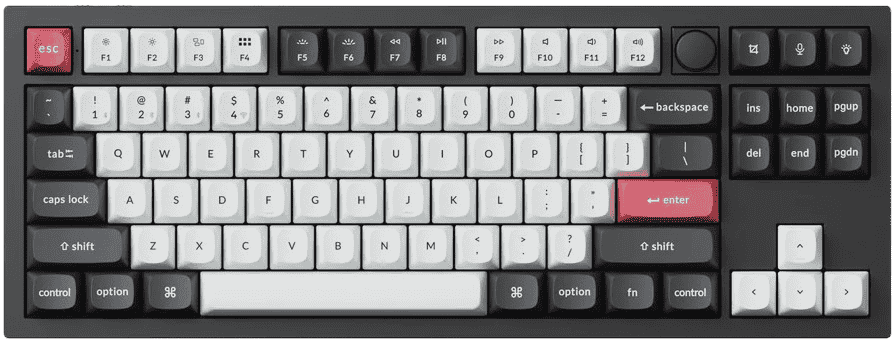
1. Best Overall: Keychron Q3

Image credit: (Keychron)
Few boards on this list balance gaming performance and everyday usability as evenly as the Q3 HE 8K. It backs that reputation with 8,000Hz wired polling, adjustable per-key actuation, and rapid trigger, putting it in the same performance bracket as more established gaming-first brands like Wooting and Razer, despite Keychron being better known historically for its typing-focused custom boards.
What sets it apart from a lot of the competition is that it doesn’t feel like a gaming board with typing bolted on as an afterthought. The aluminum gasket-mounted frame, PBT keycaps, and overall fit and finish are on par with Keychron’s premium typing-first lineup, which means it holds up just as well for long writing or work sessions as it does in a ranked match. Its web-based software is also worth calling out, since it lets you tune actuation, rapid trigger sensitivity, and directional-priority settings without installing a separate background app, something more than a few competing brands still haven’t managed cleanly.
Backed by real, verifiable specs, not just marketing claims
Feels like a premium daily keyboard, not just a gaming one
Web-based setup means no background app to install
Quad-actuation adds real per-key customization
Hot-swap locked to Keychron’s own proprietary switches
Wired only, with a premium price some reviewers question
Best For: Players who want flagship-level gaming performance in a board that also holds up as a daily-use, all-metal keyboard, and who don’t mind being locked into Keychron’s own switch ecosystem.
2. Best for FPS / Esports: SteelSeries Apex Pro

Image credit: (Amazon)
The Apex Pro TKL Gen 3 is a frequent top pick among competitive FPS players, and it’s easy to see why once you look past the spec sheet. SteelSeries built its OmniPoint 3.0 magnetic switches specifically around adjustable actuation and rapid trigger, and its in-game responsiveness ranks among the sharpest in the category, particularly in fast-paced titles like Valorant and CS2.
What separates it from some competitors on this list is real hot-swap flexibility. Unlike boards locked to a single proprietary switch, the Apex Pro TKL Gen 3 accepts other Hall Effect switches, giving players room to fine-tune feel without being stuck with SteelSeries’ stock option. The onboard OLED display and swappable game-ready presets also make it easy to jump between finely-tuned FPS settings and general use without digging through software every time.
Real hot-swap support for other HE switches
Rapid Tap and Rapid Trigger tune easily via presets
OLED display adds real day-to-day convenience
Wrist rest is comfortable and sweat-resistant
No 8,000Hz polling, unlike a few rivals
Premium price, with some rough software patches in past gens
Best For: Competitive FPS players who want class-leading rapid trigger performance and the flexibility to swap in other Hall Effect switches down the line.
3. Best Snap Tap / Razer Pick: Razer Huntsman V3 Pro

Image credit: (Amazon)
When it comes to Snap Tap specifically, this is the board built around it from the ground up, since Razer engineered and marketed the feature natively rather than treating it as an afterthought. It uses second-generation Analog Optical switches instead of true Hall Effect, but the practical result is nearly identical: adjustable actuation from 0.1mm to 4.0mm, rapid trigger, and reported latency as low as 0.58ms over its 8,000Hz wired connection.
Where it stands out is polish. It’s often regarded as one of the most refined analog gaming keyboards available, with an “Analog WASD” mode that mimics a controller’s analog stick for smoother movement in supported games, alongside onboard profiles for quick switching between game-ready presets.
Snap Tap is native and well-implemented, not bolted on
Very low reported latency at 8,000Hz polling
Analog WASD adds real controller-like precision
Magnetic wrist rest is a genuinely nice included extra
Requires Razer Synapse to function, which some reviewers dislike
Louder and less refined-sounding than mechanical or true HE rivals
Best For: Players who specifically want Snap Tap done well, plus a refined, esports-proven board backed by a major brand’s full software ecosystem.
4. Best Mid-Range Value: Corsair K70 PRO

Image credit: (Corsair)
The K70 PRO TKL stands out as the pick for players who want real Hall Effect performance without paying flagship prices. Its MGX Hyperdrive V2 switches support the same core feature set as pricier rivals: adjustable actuation from 0.1mm to 4.0mm, Rapid Trigger, dual actuation, and Corsair’s own SOCD-style feature, FlashTap, all running over an 8,000Hz AXON connection.
The tradeoff for that lower price shows up in a few specific places. Only the 61 primary keys use the Hall Effect switches; the surrounding function, arrow, and nav keys use standard mechanical switches instead, which gives the board a hybrid feel rather than a fully consistent one. The gaming performance itself draws mostly positive marks, though average sound dampening and a cluttered companion app, iCUE, come up repeatedly as complaints.
Full HE feature set at a noticeably lower price
FlashTap and Rapid Trigger work well for FPS movement
8,000Hz polling keeps latency very low
Solid aluminum-top build for the price point
Only primary keys use Hall Effect switches, not the whole board
iCUE software and sound dampening feel below the board’s price tier
Best For: Players who want real rapid trigger and FlashTap performance without paying for a full-board Hall Effect flagship.
5. Best Wireless / Work+Gaming: Keychron K2

Image credit: (Keychron)
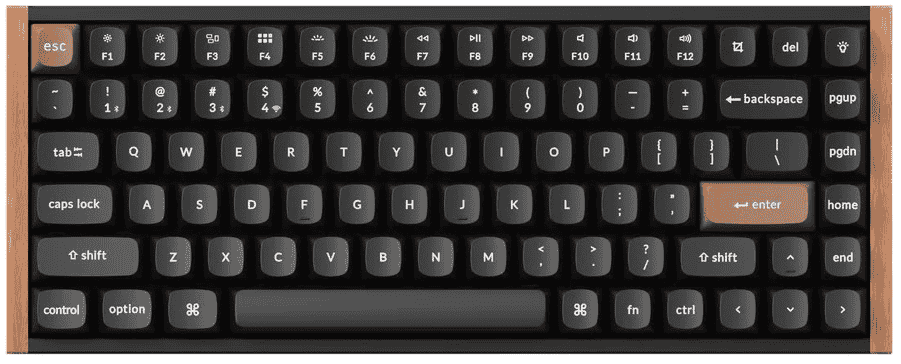
The K2 HE fills a specific gap: real rapid trigger performance without giving up wireless convenience. It runs Gateron Double-Rail magnetic switches across a 75% layout, supporting adjustable actuation, rapid trigger, last-key priority, and even joystick-style analog input, all tunable through Keychron’s web-based Launcher without installing separate software.
What makes it stand out on this list specifically is versatility. It switches between wired, 2.4GHz, and Bluetooth 5.2 connections, runs on a 4,000mAh battery rated for roughly a week and a half with RGB on, and comes in an aluminum-frame build that’s widely praised for looking and sounding more like a premium productivity board than a gaming one. That combination of daily-use polish and legitimate competitive features is what earns it the wireless pick here.
Hot-swappable switches, unlike Keychron’s own Q3 HE 8K
Genuinely strong wireless battery life with RGB on
Feels like a premium daily board, not just a gaming one
Web-based Launcher needs no separate app install
Caps out at 1,000Hz polling, not 8,000Hz
Still limited to Keychron’s own switch for now
Best For: Players who want real rapid trigger performance in a board they’re also happy to use wirelessly all day for work.
6. Best Budget Under $100: DrunkDeer A75 Pro

Image credit: (Amazon)
DrunkDeer built its name by chasing Wooting’s territory at a fraction of the price, and the A75 Pro is where that strategy shows up clearest. It runs the brand’s own Raesha magnetic switches across a 75% layout, with rapid trigger, adjustable actuation down to 0.1mm increments, and Last Win Mode, DrunkDeer’s take on SOCD priority. All of that lands well under what flagship boards charge.
The build itself punches above its price bracket too. An aluminum-accented case with shock-absorbing tilt legs gives it a sturdier, more cushioned feel than most budget boards manage, and the DrunkDeer Antler web software is frequently cited as one of the cleaner, easier-to-use drivers in this space, especially compared to some of the clunkier apps bundled with pricier competitors. The switches themselves run silent, which is a nice touch for shared spaces or late-night sessions.
Full rapid trigger and SOCD feature set at a budget price
Solid, cushioned build for what it costs
Antler software is clean and easy to set up
Silent switches suit shared or late-night setups
Caps out at 1,000Hz polling, well below flagship boards
No wireless option, so it’s wired-only
Best For: Budget-conscious players who want real rapid trigger and SOCD features without stretching into flagship pricing.
7. Best Budget Under $60: Attack Shark X68

Image credit: (Attackshark)
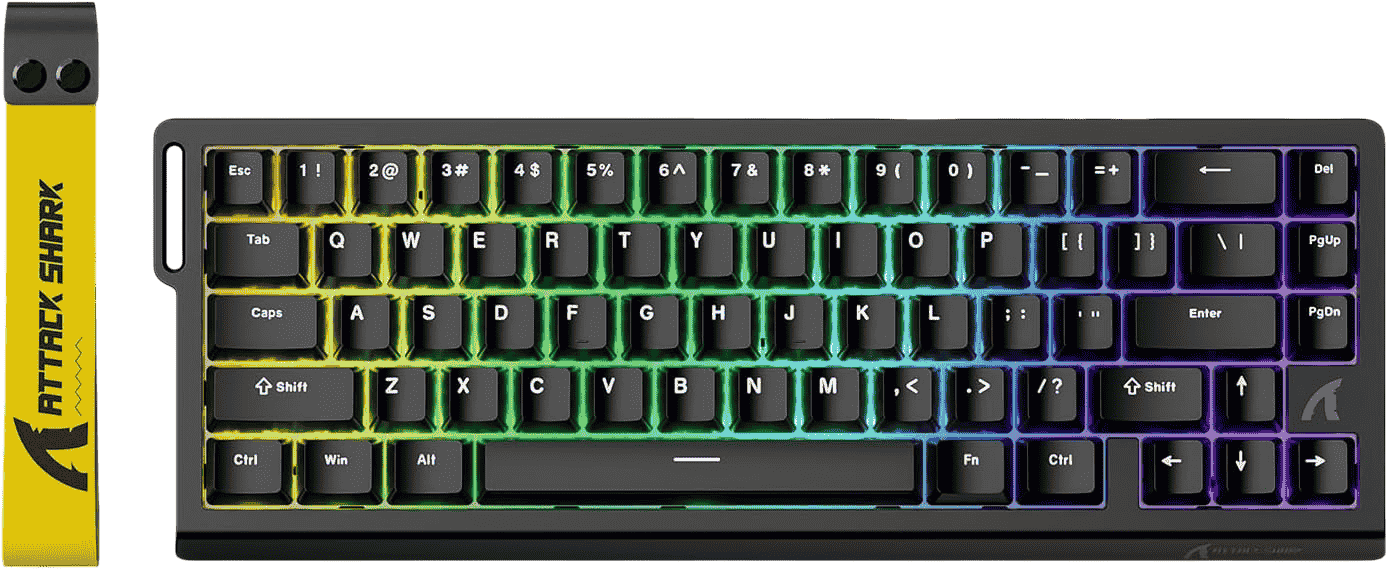
Attack Shark built the X68 HE around a simple pitch: real Hall Effect performance at a price point that used to be reserved for entry-level mechanical boards. It packs adjustable actuation from 0.1mm to 3.4mm, 8,000Hz polling, and 0.125ms latency into a compact 60% frame, numbers that would have been flagship-tier just a couple of years ago.
The catch, and it’s a fair one at this price, shows up in a few small details rather than the core performance. The 60% layout leans on an FN function layer for anything outside the main keys, which won’t suit everyone doing daily productivity work. A slight rattle on larger keys like the spacebar has also come up in hands-on writeups, along with a proprietary driver that lacks the open-source flexibility some enthusiasts look for. None of that undercuts what the board is actually built to do well: fast, precise input for a fraction of the usual cost of entry.
8,000Hz polling and true HE switches at a budget price
Actuation and rapid trigger tune down to fine increments
Compact 60% frame saves real desk space
Web-based driver is simple to pick up
Some rattle noted on larger keys like the spacebar
60% layout leans heavily on the FN layer for daily use
Best For: Budget-focused players who want real Hall Effect performance in a compact frame and don’t mind a few rough edges in build polish.
8. Best 60% Compact: NuPhy Air60

Image credit: (Amazon)
NuPhy built the Air60 HE around a low-profile design, which sets it apart from most other boards on this list before you even get to the gaming features. Underneath that slim frame sit Gateron Magnetic Jade switches with a notably wide actuation range, 0.1mm to 3.3mm, plus quad actuation points per key, meaning a single keypress can trigger up to four different commands depending on how far it travels.
The performance side holds up just as well as the design. An 8,000Hz polling rate and built-in last-input priority (NuPhy’s version of Snap Tap) put it firmly in flagship territory despite its price tag, and its NuPhyIO web driver lets you dial in every setting without installing anything locally. The low-profile format is the one thing worth flagging clearly: it’s a different feel from tall switches, closer to a laptop-style keystroke, so it’s worth deciding upfront whether that’s the typing experience you actually want before buying.
Real flagship-level specs at a mid-range price
Quad actuation points add real per-key flexibility
Low-profile design stands out from the rest of the list
Web-based setup needs no separate app
Low-profile feel won’t suit everyone used to taller switches
Wired only, with no wireless option
Best For: Players who want a distinctive low-profile typing feel without giving up flagship-level rapid trigger performance.
9. Best Premium Aluminum / Typing Feel: MonsGeek M1 V5

Image credit: (Amazon)
The M1 V5 TMR stands out by rethinking what a magnetic switch board even has to be. Instead of Hall Effect sensors, it uses TMR (Tunnel Magnetoresistance) technology, which is more sensitive and allows something HE boards typically can’t do: mixing magnetic and mechanical switches on the same PCB. That means WASD can run on ultra-precise magnetic switches while the rest of the board stays fully mechanical, all through the same hot-swap sockets.
Build quality is where this one really separates itself. A full aluminum CNC case brings real heft, close to 4 pounds for a 75% board, paired with a tool-free quick-release design that pops the case open without screws, exactly the kind of mod-friendly build featured in our guide to the best customizable keyboards. Actuation tunes down to 0.01mm precision, and the Snap Key SOCD feature is well-regarded for working smoothly right out of the box. The tradeoff comes down to keycaps: the board only ships with its stock side-printed set, so anyone wanting a different look will need to buy separately.
TMR sensors allow finer precision than typical HE switches
Mixes magnetic and mechanical switches on one board
Heavy, premium aluminum build that doesn’t cut corners
Tool-free case design makes modding simple
Ships only with stock side-printed keycaps
Case can feel slightly loose when lifted off the desk
Best For: Enthusiasts who want top-tier precision and build quality, plus the flexibility to mix magnetic and mechanical switches on the same board.
10. Best Wireless Full-Size: ASUS ROG Azoth

Image credit: (Amazon)
The Azoth 96 HE closes out this list by pushing wireless Hall Effect further than almost anything else on the market. Its ROG HFX V2 magnetic switches support adjustable actuation from 0.1mm to 3.5mm with 0.01mm precision, and both the wired and 2.4GHz connections hold a full 8,000Hz polling rate, a rare feat for a wireless board and one of its clearest standout traits.
The rest of the package matches that ambition. A six-layer dampened gasket mount, a 1.47-inch OLED touchscreen with a multifunction dial, and a full 96% layout that keeps the number pad while trimming the nav cluster all add up to a board built for people who want a daily-driver keyboard that also happens to be a serious gaming tool. ASUS’s browser-based Gear Link software avoids the need for a separate app install, though the hot-swap sockets remain locked to ASUS’s own switch line despite technically supporting swaps. Battery life, at roughly 40 hours out of the box with 8K polling active, runs shorter than typical wireless boards, a fair tradeoff given what it’s powering.
Rare 8,000Hz polling on both wired and wireless
Full 96% layout keeps the number pad in a compact frame
Premium build quality and genuinely effective dampening
Browser-based software needs no install
Battery life runs shorter than typical due to 8K polling draw
Hot-swap is still locked to ASUS’s own switches
Best For: Players who want a full-size wireless board with genuine flagship-level performance and don’t mind paying a premium price for it.
Best Rapid Trigger Keyboards by Category
Best 60%: NuPhy Air60 – flagship-level specs in NuPhy’s distinctive low-profile compact frame.
Best 65%: Keychron K2 is our rapid trigger pick, but if you want the full range of 65% options beyond RT boards, see our Best 65% Keyboards guide.
Best 75%: MonsGeek M1 V5 TMR – TMR precision with mixed magnetic/mechanical switch support.
Best TKL: Keychron Q3 – flagship 8,000Hz performance in a premium all-metal build.
Best Full-Size: ASUS ROG Azoth – full number pad without sacrificing wireless 8K polling.
Best Under $60: Attack Shark X68 is the rapid trigger pick here, but for budget boards beyond RT specifically, check our Best Budget Keyboards guide.
Best Under $150: DrunkDeer A75 Pro is our RT-specific pick at this price, if you’re weighing it against non-RT options too, the budget tier just above already covers that ground.
Best Wireless: Keychron K2 – tri-mode connectivity without giving up competitive features.
Best Low-Profile: NuPhy Air60 – a laptop-style keystroke feel paired with full flagship rapid trigger specs.
Best Aluminum: MonsGeek M1 V5 TMR – full CNC aluminum build with premium heft.
Best for Typing: Keychron Q3 – gaming performance in a board built like a daily-use custom keyboard.
Best for Valorant: Razer Huntsman V3 Pro – native Snap Tap, currently permitted in Riot’s ruleset.
Best for CS2: SteelSeries Apex Pro – strong rapid trigger performance with Rapid Tap easy to disable for Valve’s official servers.
Wooting vs SteelSeries vs Razer vs Keychron: Which Flagship Should You Buy?
Note: Wooting doesn’t sell through Amazon US, so it’s left out of this comparison entirely. What’s left is still the real decision most buyers are actually facing at the top of this market: Keychron, SteelSeries, Razer, and ASUS, each taking a genuinely different approach to a flagship rapid trigger board.
If build quality and daily typing feel matter as much as gaming performance, the Q3 is the strongest pick. It’s the one board here that doesn’t feel like it’s making a compromise in either direction.
If switch flexibility matters to you, the Apex Pro stands alone in this group. It’s the only one that accepts other Hall Effect switches instead of locking you into the brand’s own parts.
If Snap Tap is the specific feature you’re chasing, Razer built it natively and refined it more than any competitor here, though that comes bundled with a switch technology that isn’t true Hall Effect.
If you refuse to give up wireless, the Azoth 96 is the only board on this list that holds 8,000Hz polling without a cable, though that comes at both a higher price and shorter battery life than a wired flagship.
There’s no single correct answer here. Each board wins clearly on the one thing it was built to prioritize, and the right pick comes down to which of those four priorities matters most to you.
Best Alternatives to Wooting (That Don’t Cost $200, or the Import Hassle)
Wooting built its reputation as the board that popularized rapid trigger in the first place, and a lot of buyers still search for it by name. There’s a practical catch, though: Wooting doesn’t sell through Amazon US, which means US buyers are often stuck choosing between importing directly or paying a markup on third-party listings. That alone is reason enough for a lot of people to look elsewhere, price aside.
The good news is the boards that have filled Wooting’s role since then are easy to find, cover a wider range of budgets, and ship directly through Amazon with normal US warranty support. Here’s where to look depending on what drew you to Wooting in the first place.
If it was the flagship performance and build quality: The Keychron Q3 matches Wooting’s top-tier specs, 8,000Hz polling, adjustable actuation, rapid trigger, in an all-metal build that holds up just as well for typing as it does gaming. See the full breakdown above.
If it was the compact, enthusiast-favorite form factor: The NuPhy Air60 covers that ground with a distinctive low-profile 60% design and genuinely flagship-level specs, at a noticeably lower price than Wooting’s compact lineup.
If it was the idea of a board you could tune down to the smallest detail: The MonsGeek M1 V5 goes a step further than most Wooting boards even do, with 0.01mm actuation precision and the ability to mix magnetic and mechanical switches on the same board.
If budget is the real deciding factor: The DrunkDeer A75 Pro delivers the core rapid trigger and SOCD feature set Wooting is known for, at a fraction of the cost.
None of these are trying to be a Wooting clone. Each one takes the specific thing that made Wooting stand out and either matches it or pushes past it, without the import headache.
Rapid Trigger Setup Guide: Settings That Actually Help
Rapid trigger only helps if it’s actually configured for the game you’re playing. Community testing and pro-player profiles consistently point to a few sensible starting ranges, though the right numbers ultimately come down to your own consistency, not a single universal setting.
CS2: Because CS2’s movement relies on inertia-based counter-strafing, going too aggressive can backfire. A common starting point is actuation around 0.5mm–0.8mm with a reset around 0.2mm–0.4mm, tightening from there only if your inputs stay clean. Some experienced players even find that a fixed, deeper actuation (around 1.5mm) with rapid trigger off feels more consistent in multi-target fights, since sharper isn’t always better here.
Valorant: Valorant doesn’t have CS2’s inertia system, so it rewards stopping immediately after releasing a key. A lighter setup works well, actuation around 0.7mm–1.0mm with a reset around 0.2mm–0.4mm for a conservative start, or actuation down to 0.3mm–0.6mm for players comfortable with a snappier feel.
Apex Legends: A widely used starting profile sets movement keys (WASD, crouch, jump) to a 0.4mm actuation point with a 0.1mm–0.3mm reset sensitivity, giving quick direction changes without needing pixel-perfect precision.
The most common mistake: setting every key to the lowest possible actuation right away. Extremely low settings amplify any unsteadiness in your fingers, turning small movements into accidental double-inputs. Start conservative, test in a private match or deathmatch, and lower the numbers gradually only if your inputs stay clean.
On SOCD/Snap Tap: this is a separate setting from rapid trigger, and it needs separate attention. Valve has banned SOCD/Snap Tap-style features in CS2 since August 2024, so this needs to be switched off before joining official matches, even if rapid trigger itself stays on. Valorant currently permits it under the latest ruleset, but policies like this can change, so it’s worth confirming the current rule before a tournament or ranked session rather than assuming it’s still allowed.
Rapid Trigger Keyboard Buying Guide
Form Factor (60% / 65% / 75% / TKL / Full-Size)
Smaller layouts save desk space and keep your mouse hand closer to center, which is why 60% and 65% boards are popular for FPS-focused setups (see our full keyboard size guide if you’re still deciding what layout suits you generally, beyond rapid trigger specifically).The tradeoff is losing dedicated arrow keys, a function row, or a nav cluster, all pushed behind an FN layer instead. TKL keeps the function row and arrow keys while dropping the number pad, a common middle ground for players who also need to hop between games and other tasks. Full-size and 96% boards keep everything, useful for anyone doing spreadsheet work or number entry alongside gaming, at the cost of extra desk real estate.
Switch Tech: HE Magnetic vs. TMR vs. Analog Optical
Most boards on this list use Hall Effect magnetic switches, which read a magnet’s position continuously instead of relying on a single physical contact point. TMR (Tunnel Magnetoresistance), used on boards like the MonsGeek M1 V5, works on a similar principle but with finer sensitivity, which is part of why it can support features like mixing magnetic and mechanical switches on one board. Analog optical, Razer’s approach, uses light instead of magnetism to track position, landing on largely the same practical benefits, adjustable actuation and rapid trigger, through a different sensor entirely. None of these are objectively “better” across the board; the practical differences show up more in specific features like hot-swap flexibility than in raw feel.
Polling Rate (1,000Hz vs. 4,000Hz vs. 8,000Hz)Optical
Higher polling means the keyboard reports its state to your PC more frequently. 1,000Hz remains a perfectly competent standard, and most players won’t consciously notice the jump to 8,000Hz. Where it can matter is stacked with rapid trigger at very low actuation points, where faster reporting catches the release moment slightly sooner. It’s a genuine spec worth having if the price difference is small, but not one worth chasing at the expense of build quality or switch flexibility.
Hot-Swap Compatibility
Hot-swap sockets let you replace switches without soldering, but “hot-swap” doesn’t always mean open compatibility. Some boards, like the Keychron Q3 and ASUS ROG Azoth, technically support hot-swap but remain locked to the brand’s own switch line. Others, like the SteelSeries Apex Pro and MonsGeek M1 V5, accept a wider range of third-party HE or mechanical switches. If switch experimentation matters to you, check this distinction specifically rather than assuming “hot-swappable” means fully open.
Wireless vs. Wired Latency
Wired connections remain the safest choice for competitive play, since they avoid any wireless-related variability entirely. That said, wireless HE boards have closed much of that gap; the ASUS ROG Azoth, for example, holds a full 8,000Hz polling rate over its 2.4GHz connection, something that would have been unheard of on a wireless board a couple of years ago. The real tradeoff with wireless HE boards tends to be battery life rather than latency, since magnetic switches and high polling both draw more power.
Software Quality
Software matters more with HE boards than traditional mechanical ones, since actuation points, rapid trigger sensitivity, and SOCD behavior all need to be configured somewhere. Web-based drivers, used by Keychron, NuPhy, and DrunkDeer among others, tend to get praised for being lightweight and not requiring a separate install. Fuller software suites like Corsair’s iCUE or Razer’s Synapse offer deeper customization but come with a heavier footprint and, in some cases, a steeper learning curve.
Build Quality: Aluminum vs. Plastic, Gasket Mount, Keycap Material
Aluminum top plates and gasket-mounted designs generally feel sturdier and sound better than plastic tray-mount builds, though they also add weight and cost. PBT keycaps resist shine and wear better than ABS over time, which matters more the longer you plan to keep a board. None of this affects rapid trigger performance directly, but it’s a real factor in whether a board feels worth its price beyond the spec sheet.
Final Thoughts: Picking the Right Rapid Trigger Keyboard
Rapid trigger isn’t a spec you need to chase blindly. The right board comes down to what you actually play, how you play it, and whether you want a board that also earns its keep outside of matches. If you want the safest all-around choice, the Keychron Q3 covers flagship performance and daily-use build quality in one board. If FPS performance is the only thing that matters, the SteelSeries Apex Pro and its open hot-swap support are hard to beat. And if budget is the deciding factor, the DrunkDeer A75 Pro proves you don’t need to spend flagship money to get genuine rapid trigger and SOCD features.
Whichever board you land on, most of these are hot-swappable, which means the switches you start with don’t have to be the switches you finish with. If you want to fine-tune feel further down the line, our guide to installing switches on hot-swap keyboards walks through the process step by step.
Ready to upgrade your setup? Check today’s price on our top pick, the Keychron Q3, and start counter-strafing like it actually matters.
Frequently Asked Questions
For competitive shooters where quick direction changes matter, yes. For slower games, general use, or typing-heavy work, the benefit is much smaller, and a good mechanical board will likely feel just as satisfying for less money.
It’s most useful in movement-heavy titles like CS2 and Valorant, where fast key releases translate directly into cleaner strafes and quicker stops. In slower-paced or turn-based games, it has little practical effect.
SOCD (Simultaneous Opposing Cardinal Directions) describes what happens when two opposite keys, like A and D, are pressed together. Snap Tap and Rapid Tap are brand names for SOCD-resolution features that prioritize whichever key was pressed most recently instead of canceling both inputs out. It’s a separate feature from rapid trigger, not a version of it.
It’s a real spec, but not one most players will consciously notice. It helps most when paired with rapid trigger at very low actuation points, where faster reporting catches a key release a fraction of a millisecond sooner. If two boards are otherwise similar, higher polling is a nice tiebreaker rather than a reason to upgrade on its own.
Yes, it’s common in the pro CS2 and Valorant scenes specifically for the movement precision it enables. That said, some pros still prefer fixed actuation points, so it isn’t a universal preference even at the top level.
Not really. Typing benefits more from actuation force, key feel, and stabilization than from how quickly a key resets. Some players do find very light, fast-resetting keys feel snappier for typing, but it’s a matter of personal preference rather than a real productivity gain.
It depends on the game. Valve has banned SOCD/Snap Tap-style features in CS2 since August 2024, and using them on official servers can get you kicked from a match. Valorant’s current ruleset permits it, though Riot could change that in the future, so it’s worth checking the current rules before relying on it in ranked or competitive play.
It can, especially if actuation is set too low too quickly. Setting every key to the minimum distance right away tends to amplify small hand tremors or unsteady presses into unintended inputs. Most guides recommend starting with a moderate actuation point and lowering it gradually.
No. TMR (Tunnel Magnetoresistance) and analog optical switches, used by brands like MonsGeek and Razer respectively, achieve the same practical result through different sensor technology. All three avoid the fixed contact point that traditional mechanical switches rely on.
They can, though the benefit shrinks outside of fast-movement genres. Fighting games and rhythm games are the other categories where quick, precise key resets sometimes offer a real advantage.
How We Keep This List Updated
Rapid trigger keyboards are a fast-moving category, with new models and firmware updates showing up regularly. To keep this guide useful, we review it on a quarterly basis at minimum, checking every pick against current pricing, availability, and specs.
Between scheduled reviews, we also update the list when something specific changes: a featured board gets discontinued or replaced by a newer version, a manufacturer updates firmware in a way that changes actuation range or polling support, a significant price shift moves a board out of its stated budget tier, or a new release clearly outperforms an existing pick in its category. Anti-cheat policy changes around SOCD and Snap Tap, in particular, get checked independently of the regular update schedule, since those rules can shift faster than hardware does.
If you spot something here that looks outdated, whether it’s a discontinued model, a broken link, or a spec that’s changed, feel free to reach out. This list is meant to reflect what’s actually worth buying right now, not what was true when it was first published.
Discover the Best Keyboards for Fortnite with ultra-fast response, durable switches, and ergonomic designs dominate every match with precision and comfort!
Explore the best 65% keyboards with compact layouts, customizable switches, and premium builds for typing and gaming in tight spaces.
Our guide to the best customizable keyboards of 2026 moves beyond lists. Find your perfect match for typing feel, sound, and workflow.
Looking for the Best Hot Swappable Keyboards? We compare socket type, QMK/VIA support, and layout across 8 picks so you buy the right one.