
Last updated on June 12th, 2026 at 12:38 pm
Most 75% keyboards use between 81 and 84 switches one for every key. The exact number depends on the board, not a fixed standard. Full-size keyboards use 104 or more switches, TKLs use around 87, and the 75% layout sits between them by packing the navigation cluster and arrow keys tightly against the main typing area, which is exactly why the count shifts from model to model.
Here’s the range across three common approaches to the layout:
A quick note before you rely on any of these numbers: switch counts vary by board revision, region, and knob/screen configuration, and manufacturers update specs without much notice. Treat every figure in this guide as a starting point compiled from publicly listed specs, not a guarantee always confirm the exact key count on the current product page or in the manual before you order switches or a keycap set.
What Actually Counts as a 75% Layout
A 75% keyboard sits between a compact 60% and a full-size TKL. It keeps nearly everything a tenkeyless board offers, but removes the wasted space between key clusters that’s the whole design premise.

A 75% keyboard layout showing all key groups packed tightly together with no gaps between clusters.
- Number pad (17–21 keys) — the single biggest space saver
- Large gaps between sections — keys sit close together instead
- The extra column above the arrow keys that some TKLs include
The defining trait is the missing gap. On a TKL, there’s a visible strip of empty space between the main typing area and the navigation/arrow cluster. On a 75% board, that gap is gone the keys sit flush against each other, which is what makes the layout read as denser even though it holds nearly the same key count.
A fast way to check in a product photo: if the arrow keys touch the Shift key and Delete sits directly above the right arrow, you’re looking at a true 75%. A visible notch between those clusters usually means an exploded 75% or a compact TKL instead.
- Function row present (12 keys)
- Arrow keys present (4 keys)
- Navigation cluster present, typically 4–6 keys
- No number pad
- No gap between the main area and the navigation keys
- Roughly 30–40% smaller footprint than a full-size board
Why the layout exists: it’s built for people who want everything a TKL offers in a size that actually fits a small desk. That covers writers who lean on arrow and navigation keys, programmers who use Home/End/PgUp/PgDn constantly, gamers who want more room to swing a mouse, and anyone who’s tired of reaching past a number pad they never touch.
Switch Counts on Popular 75% Models
Theory only gets you so far, so here’s how that plays out across real boards. The figures below are compiled from publicly listed specs and layout images, not from a physical count on our own units we’re flagging that directly rather than implying hands-on verification we didn’t do. Cross-check against the current listing before you order switches, since manufacturers do revise layouts between batches.
A note on accuracy: the original version of this table included three models the Akko 3068B, LTC NB681, and Epomaker RT100 that turned out to be misidentified. All three are genuine, well-known keyboards, but none of them are actually 75% boards: the 3068B and NB681 are 65% layouts (68 keys), and the RT100 is a 95%/1800-compact layout with a full number pad (97 keys). We’ve corrected the table below to only include verified 75% models, and we’re flagging the mistake directly rather than quietly fixing it, since it’s exactly the kind of error this guide is trying to help you avoid.
Compact layout, no gaps, full navigation cluster, nothing omitted. If your goal is the maximum key count in a 75% footprint, look for “compact 75%” or “no gap” in the listing description.
These use an exploded layout, where visible gaps separate the arrow cluster from the main block. On these two specific models the spacing does come paired with fewer physical switch positions but that’s not a universal rule for every exploded board, so check the actual key count in the listing rather than assuming spacing always costs keys.
These trim the navigation cluster down to the essentials, usually Delete, Page Up, and Page Down, dropping Insert and Scroll Lock and sometimes Pause. If you never touch those keys, you won’t miss them. If you’re a programmer who lives on Insert and Home, skip these. Want an even smaller footprint and don’t mind losing the function row too? Our Best 65% Keyboards guide covers that trade-off.
The Epomaker RT100 has a rotary knob. Does that eat a switch position? It depends entirely on the board.
On the RT100, the knob sits as an add-on the listed switch count stays at 84. On other boards, including some GMMK Pro knob configurations, the knob does replace one or two switch positions, which drops the count into the 82–83 range. This isn’t consistent across brands, so treat it as something to verify per model rather than a rule you can apply everywhere.
Why the Number Varies
A lot of buying guides state “a 75% keyboard has 84 switches” and leave it there. That’s an oversimplification. The real number comes down to three specific design choices, and understanding them will help you shop without getting caught short when your switch order arrives.

Three key design variations that affect switch count in a 75% keyboard: navigation cluster size, layout spacing, and knob replacements.
This is the biggest factor. Manufacturers decide how many of six possible keys to include:
- Full cluster (6 keys) → 84 total. Insert, Delete, Home, End, Page Up, Page Down common on budget and older 75% designs.
- Compact cluster (4 keys) → 82 total. Insert and End are dropped, often because Insert sees little use and End can be mapped to an Fn layer.
- Minimal cluster (3 keys) → 81 total. Only Delete, Page Up, and Page Down remain; Home and End move to Fn layers. Common on ultra-compact or travel-focused boards.
If you don’t see Insert and Scroll Lock in a product photo, you’re likely looking at 81 or 82 switches rather than 84.
This one is about physical layout, not necessarily missing keys.
- Compact (no gaps): every key sits against its neighbor, maximum density, and this is the original 75% design.
- Exploded (with gaps): small gaps separate the arrow cluster from the main block. On some boards this costs a couple of key positions because the PCB stretches slightly wider within the same case; on others the spacing is purely cosmetic and the key count holds. Check the spec sheet rather than assuming one or the other.
A quick visual test: look at the bottom row. Evenly spaced, full-sized modifier keys running right up to the arrows usually signal a compact layout. A visible gap before the arrows usually signals exploded.
Knob, screen, or badge
Not everything that looks like a key sits on a switch.
- Rotary knob: may replace one or two switches, or none at all, depending on the board. Read the spec sheet instead of assuming.
- OLED screen: typically replaces zero switches. A small display mounts on the PCB between keys without taking a switch socket, so it’s usually a pure add-on.
- Badge or logo plate: on some premium boards, a metal or acrylic badge occupies what would otherwise be one to four key positions, permanently. Those boards commonly list 80–83 switches instead of 84.
Before you buy switches or a board, do three things: count the visible keycaps in the product photos, read the spec sheet for the listed key count rather than assuming, and treat “exploded” or “knob version” in a listing as a signal to expect 81–83 rather than 84.
75% vs. Other Keyboard Sizes
A number means little without something to compare it to. Here’s how 75% stacks up against the rest of the lineup, and why it’s often called the “Goldilocks” size.

Keyboard sizes compared by switch count from compact 40% layouts to full-size boards highlighting how 75% fits in the middle.
The short version: 40% and 60% trade keys for desk space and lean hard on layers; 65% adds arrows and a couple of nav keys back in; 75% keeps nearly everything a TKL has but removes the gaps, which is why it reads as the efficient middle ground for programmers and writers who use shortcuts constantly. TKL and 1800-compact give some of that space back in exchange for a more familiar, spread-out feel, and full size exists for anyone who wants a dedicated key for absolutely everything. For a closer look at that top end of the range, see our What is a TKL Keyboard guide.75% isn’t just “TKL minus 3 switches.” TKL has 87 switches and 75% tops out around 84, so it’s tempting to treat them as nearly identical. They’re not. The 75% layout removes the physical gaps between sections, which trims roughly 1.5 inches (about 4 cm) off the total width. Those three missing switches aren’t lost functionality they’re the empty space you never used in the first place.
- Need a number pad → full size or 1800-compact
- Desk space is genuinely tiny → 60% or 65%
- You use F1–F12 and Home/End constantly → 75% or TKL
- You want max desk space but still want dedicated arrows → 65%
- You want everything but hate wasted gaps → 75%
- You’d rather not think about function layers at all → TKL or full size
How Many Switches to Actually Buy
Once you’ve picked a board, the switch-buying decision is simpler than it looks. Buy a 90-pack or 110-pack. Skip the 70-pack.
A 75% board needs 81 to 84 switches. A 70-pack leaves you 11 to 14 short, which means an incomplete board and a second order while you wait on the gap.
A 110-pack makes sense if you’re lubing switches for the first time and expect to damage a few, you want spares of the same switch for a future build, or the 90-pack happens to be sold out and you don’t want to wait. Otherwise the 90-pack is the better default enough headroom without much waste.
One more thing on hot-swap sockets: if your 75% board is hot-swappable, which most now are, you don’t need solder or special tools the switches push straight into the sockets. Bent pins are still common for first-timers, though, so those 6–9 extras from a 90-pack tend to get used.
Conclusion
A 75% keyboard doesn’t have one fixed switch count. Most fall between 81 and 84, and where a specific board lands depends on three things: how many navigation keys it keeps, whether the layout is compact or exploded, and whether a knob, screen, or badge takes up a switch position.
That’s the reason two keyboards can both be labeled “75%” and still need different switch counts to fill.
- Count the visible keycaps in the product photos
- Check the listing for gaps or a knob configuration
- Don’t default to assuming 84
If you’re buying switches separately, a 90-pack covers nearly every 75% layout with a small cushion for mistakes or future swaps.
Once you know what to look for, you’ll spot these details in seconds and you won’t end up short on switches halfway through a build.
If you’re still deciding on a size rather than just counting switches for one you’ve already picked, our keyboard size guide covers the full range from 40% to full-size in one place.
Have a 75% board we didn’t cover? Drop the model and switch count in the comments it helps the next reader make the right call.
FAQs
Yes. Any key wider than 2u Spacebar, Enter, Shift, Backspace needs a stabilizer to prevent wobble. Most 75% boards use 4–5 stabilizers total, and lubing them noticeably improves feel.
Almost always, as long as the PCB is hot-swappable and the switch is MX-style (Cherry, Gateron, Kailh, and similar) that covers the vast majority of mechanical switches on the market. The exception is optical switches, which need a dedicated optical PCB and won’t fit a standard hot-swap socket. When in doubt, stick with mechanical.
The same as the switch count: 81–84. Most keycap sets are sold as full 104-key sets, so you’ll end up with extras. Look for a listing labeled “75% kit” or “TKL kit” instead they cost less and include the correct 1.75u right Shift key that a full-size set won’t have.
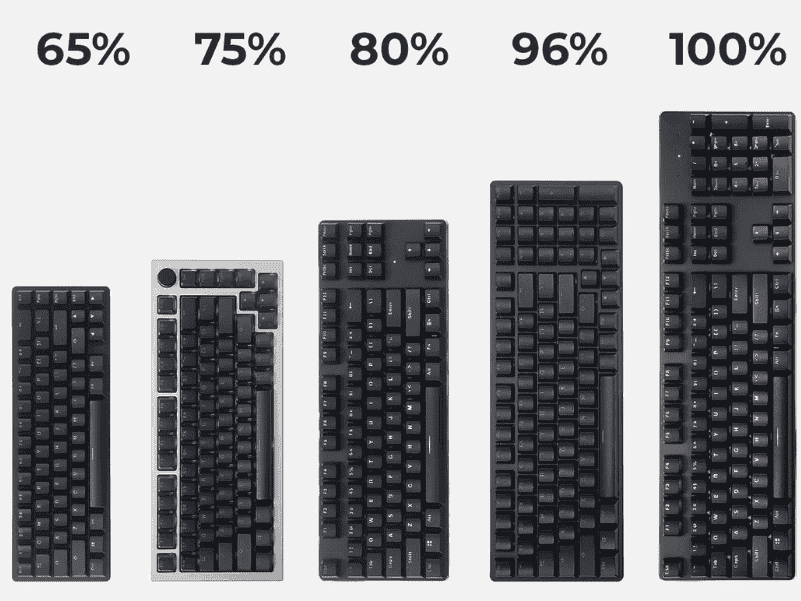
The Ultimate Keyboard Size Guide for Beginners helps you choose the right layout, dimensions, and ergonomics for comfortable, efficient typing and gaming.

What is a TKL Keyboard? Learn how a tenkeyless layout saves desk space, boosts comfort, and improves performance for gamers and typists.
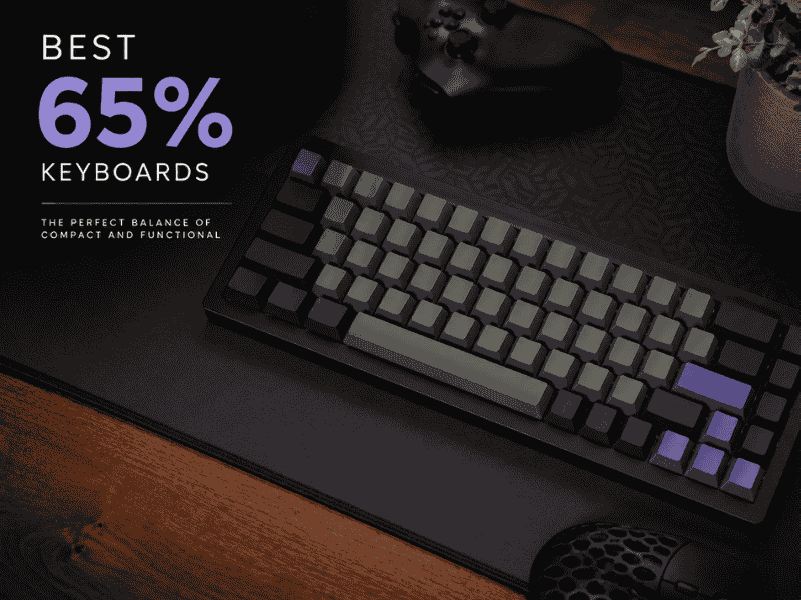
Explore the best 65% keyboards with compact layouts, customizable switches, and premium builds for typing and gaming in tight spaces.

What are Alice Mechanical Keyboards? Learn ergonomics, Alice vs Arisu vs split, who should buy one, and the best beginner boards.