
Last updated on October 8th, 2026 at 03:30 pm
The best keyboards for big hands are not always the widest ones. A full-size board adds a number pad and extra keys around the edges, but the letter keys usually keep the same size and spacing as on a smaller board. What matters is what actually feels wrong: your hands feel pushed together, your fingers land on two keys at once, or you miss the keys a compact layout removes.
This guide matches six keyboards sold on Amazon US to those specific problems. Start with the one closest to yours:
- Familiar ergonomic office layout: Logitech ERGO K860
- Budget ergonomic: Perixx PERIBOARD-512B
- Hands feel too close together: Kinesis Freestyle2
- Full-size mechanical for work or coding: Keychron V6
- Full-size gaming: Corsair K70 Core RGB
- Deep contoured change, steep learning curve: Kinesis Advantage360
We shortlisted these six by comparing manufacturer specs, current Amazon US listings, and what typists with large hands say in community discussions. None of them is advertised with larger letter keys. Check the current price and seller on Amazon before you buy.
Quick Comparison
What “Keyboard for Big Hands” Actually Means
Almost every keyboard uses about the same key spacing, roughly 19 mm from the center of one key to the next. So a bigger board does not give your fingers more room per key. It gives you more room around the keys.
That is why “big hands” really means one of four different problems.
A wide palm or broad shoulders can leave your wrists angled inward on a standard board. A split or separated layout can help by letting you set the distance between your hands.
Wide fingertips are the hardest problem to solve, because spacing is mostly fixed. Sculpted keycaps and columnar layouts can guide your fingers more accurately.
A larger hand can hang over the front edge of a flat board. A palm rest and a comfortable tilt can help your palms sit more naturally.
Smaller layouts drop the number pad, arrow keys, or navigation cluster. A full-size board keeps them, so you do not have to rely on function layers.
Footprint, spacing, and keycap shape are different things
- Footprint: how much desk space the board takes.
- Key spacing: the distance between key centers.
- Keycap shape: how the tops of the keys guide your fingers.
Does a Bigger Layout Help?
Sometimes. A bigger layout changes what surrounds your hands, not the grid under them. On most standard boards, the letter keys sit about 19 mm apart, whether the board is full-size or 60%. That is common practice, not a guarantee for every model, so check the spec sheet if spacing matters to you.
- You enter numbers or use shortcuts all day: full-size.
- Your mouse hand feels stretched: tenkeyless or 75%.
- You want minimal reach and can live with layers: 65% or 60%.
Large-handed typists disagree on compact boards. Some like the shorter reach, others find them cramped. Neither camp is wrong, and a 60% board is not automatically too small for big hands. For a full breakdown of every size, see our keyboard size guide.
If you can, try the exact layout before you buy. If you cannot, sketch the board’s outer dimensions on paper to check desk fit. That tells you about footprint only. It will not tell you how your fingertips feel on the keys. All six picks in this guide use standard key spacing. What they offer instead is hand angle, separation, palm support, or full key access. We also looked for boards with genuinely enlarged keycaps. The only one we found was not reliably available on Amazon US, so it did not make the list.
How to Choose the Right Features
Pick the feature that solves your actual problem. Paying for the wrong one is the most common mistake.
Find your problem in the first column, then jump to the matching pick.
Split type. An adjustable split lets you set the distance between your hands. A fixed split gives you a set curve. Adjustable suits wider shoulders or a wider stance. Fixed is simpler and usually cheaper.
Palm support. A larger hand can overhang a flat board. An integrated or removable palm rest helps, but only if your desk height and chair let your wrists stay level.
Keycap shape. Sculpted caps can guide your fingers, so they help accuracy more than room.
Learning curve. Contoured and columnar layouts ask you to retrain your hands. Expect slower typing at first. A familiar full-size board has almost no adjustment period.
- Switch type. Linear, tactile, or membrane changes feel and noise, not fit. If you want help choosing, see our mechanical keyboard switch guide.
- RGB and extra keys. Nice to have, unrelated to hand size.
- Wireless. Convenient, but only worth it if you move the board often.
Best Keyboards for Big Hands: Our Six Picks
1. Best for a Familiar Ergonomic Office Layout
Best for: typists who want a better hand angle without relearning the keyboard.
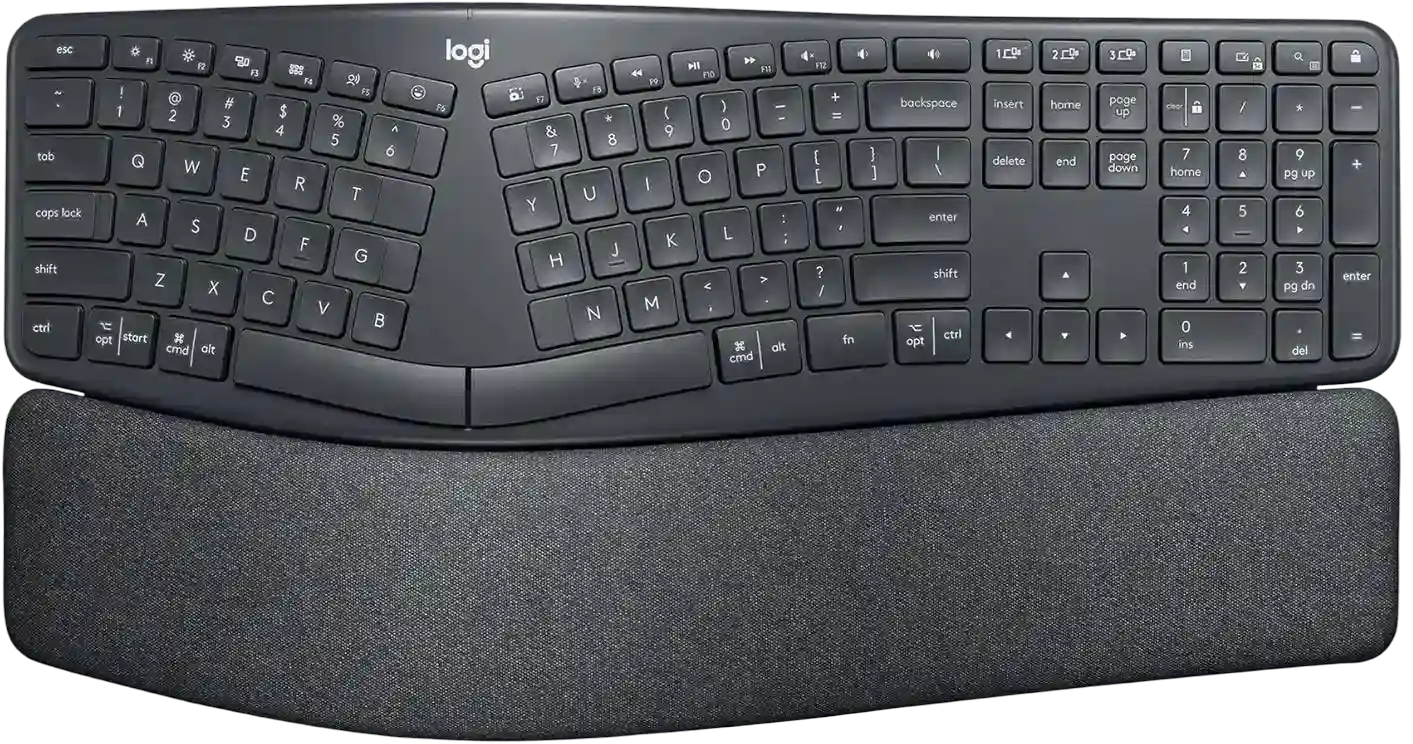
Image credit: (Amazon)
The ERGO K860 keeps the full-size layout you already know, number pad included. Nothing hides on a function layer, so shortcuts and number entry work the way they do on any standard board. If you are moving from a flat keyboard, there is very little to relearn.
What changes is the shape. A curved, split frame angles your hands more naturally than one straight row. For larger hands, that matters because a wide palm and wide shoulders often push the wrists inward on a flat board. The scooped keys are also designed to guide your fingertips toward the center of each key.
The integrated palm rest is the other useful detail. A bigger hand tends to overhang the front edge of a flat board, and a built-in rest gives the palm somewhere to land. Three tilt positions let you adjust the angle to your desk and chair.
Familiar full-size layout with a number pad
Curved split frame angles your hands more naturally
Integrated palm rest supports larger palms
Three tilt positions to match your desk
The split is fixed, so you cannot spread the halves
The wide frame can push your mouse farther out
Skip it if you want a separately adjustable left and right half. The Kinesis Freestyle2 fits that need better.
Our verdict: a sensible pick when the problem is hand angle or desk posture. It is the least disruptive step up from a flat board.
2. Best Budget Ergonomic Keyboard
Best for: typists who want an ergonomic shape without paying for a premium board.

Image credit: (Amazon)
The PERIBOARD-512B is a full-size, 104-key US keyboard with the number pad intact. The arrows, navigation keys, and function row all sit where you expect them. If a compact board’s missing keys are what frustrate you, this one keeps everything on the surface.
The shape is the point. A molded 3-D split curve angles each hand away from the center, so your wrists are not forced into one straight row. For larger hands, that can ease the inward angle a wide palm or broad shoulders create on a flat board. An integrated palm rest runs along the front edge, which gives a bigger hand somewhere to sit instead of hanging off the board.
The trade-off for the lower cost is flexibility. The curve is fixed, so you get one shape and cannot adjust it.
Every key stays in its familiar place
Fixed 3-D split curve angles your hands outward
Integrated palm rest supports larger palms
Wired USB connection, so no batteries or pairing
The curve is fixed and cannot be adjusted
Wired USB only, with no wireless option
Skip it if you want a wireless board. The PERIBOARD-512B connects by USB cable only, and the Logitech ERGO K860 is the wireless option in this guide.
Our verdict: a solid budget pick if the fixed curve feels natural to you. You get hand angle and palm support at a low cost, with no adjustability.
3. Best for Hands That Feel Too Close Together
Best for: typists whose hands and arms feel cramped toward the center of a standard board.

Image credit: (Amazon)
The Freestyle2 splits the keyboard into two separate halves joined by a cable. You can move each half apart and angle it to suit your own stance. Most ergonomic boards give you one fixed shape. This one lets you build yours.
That matters when a wide frame or broad shoulders push your hands inward. Instead of reaching toward the middle, you set each half where your hands already fall. The layout itself is a standard PC arrangement with a tenkeyless-style main field, so most keys sit where you expect them.
The number pad works differently here. It is an embedded 10-key layer on the main keys, not a dedicated block. That keeps the board narrow, but it takes some adjustment if you enter numbers all day.
Two halves you can separate to match your stance
Each half can be angled to suit your wrists
Familiar PC layout with a compact main field
Low-force keys with a short, light press
The number pad is an embedded layer, not dedicated keys
Accessories are sold separately
Skip it if you rely on a dedicated number pad for data entry. The Logitech ERGO K860 or Keychron V6 keep one.
Our verdict: the best fit in this guide when the problem is hand position. If your hands feel squeezed together, being able to set the distance yourself is worth more than any fixed curve.
4. Best Full-Size Mechanical for Work and Coding
Best for: typists who want a mechanical board with a number pad, navigation keys, and the freedom to remap.

Image credit: (Amazon)
The V6 is a conventional full-size board with 108 keys. The number pad, arrow keys, and navigation cluster are all physical keys, so nothing is buried under a layer. That makes it a practical pick if you write code, work in spreadsheets, or lean on shortcuts all day.
Its fit story is about the keycaps, not the frame. The sculpted OSA PBT caps have a taller, shaped profile that changes how your fingertips meet each key. For some larger hands, a contoured cap can feel more guiding than a flat one. It is a feel difference, so treat it as a bonus rather than a fix.
The other draw is flexibility. The switches are hot-swappable, so you can change them without soldering, and QMK/VIA support lets you remap keys and build layers. If you ever want to move a key closer to your hand, this board lets you.
Physical number pad and navigation keys, no layers
Sculpted OSA PBT keycaps shape how your fingertips land
Hot-swappable switches, no soldering needed
QMK/VIA remapping for custom layouts and layers
Wired only, with no wireless option
Flat, conventional shape with no ergonomic angle
Skip it if your main problem is wrist angle or hand position. The V6 is a flat, one-piece board, so the ergonomic picks above fit that better.
Our verdict: a strong choice if you want a familiar full-size layout with mechanical switches and real customization. It is not built for big hands specifically, but it lets you remap keys and swap switches to suit your own reach.
5. Best Full-Size Gaming Keyboard
Best for: gamers who want a full-size mechanical board and have the desk width for it.

Image credit: (Corsair)
The K70 Core RGB is a 105-key full-size keyboard with linear MLX Red switches. The number pad and navigation keys are all present, so it also works as an everyday typing board. It is built around gaming features, which is the main reason to pick it over the Keychron V6.
For larger hands, the useful detail is the removable magnetic palm rest. A bigger palm tends to hang off the front edge of a flat board, and a firm rest gives it somewhere to land. Because it is removable, you can try it with and without and keep whichever suits your desk height.
The gaming specs are the rest of the case. The switches have a 45 g actuation force, the report rate is 1,000 Hz, and full-key rollover means multiple keys register at once. Those matter for fast play, not for hand fit, so read them as extras.
Dedicated number pad and navigation keys
Removable magnetic palm rest supports larger palms
Linear switches suit fast, repeated presses
1,000 Hz report rate and full-key rollover for gaming
The full-size frame can push your mouse farther out
Gaming features add little for everyday typing
Skip it if you mostly type rather than game. The Keychron V6 is the full-size pick built around work and coding.
Our verdict: a conditional pick. It makes sense for gamers who want the full layout and a removable palm rest, and who can spare the desk width.
6. Best for Deep Contoured Typing
Best for: typists who want a radical change in how their hands sit and reach, and will accept a learning period to get it.

Image credit: (Amazon)
The Advantage360 is a split, contoured keyboard. Each half has concave key wells, so your fingers drop into a bowl instead of reaching across a flat plane. The keys sit in straight columns rather than the staggered rows of a standard board. Your fingers travel up and down instead of sideways, which changes how reach works.
The two halves are separate modules, so you can position them where your hands fall and tent them upward. For larger hands, that combination of separation and tilt is the draw. Kinesis publishes the board’s dimensions, so you can check the spread between the halves against your own shoulder width.
Plan for a retraining period. The layout is unlike a standard keyboard, so expect slower typing at first. This is the most expensive pick here, and also the biggest commitment.
Concave key wells change how your fingers reach
Columnar layout replaces staggered rows
Separate halves can be positioned and tented
The most dramatic ergonomic change on this list
Steep learning curve with slower typing at first
Premium cost and a third-party seller on the listing
Skip it if you want a familiar layout or share a keyboard with others. The Logitech ERGO K860 changes far less.
Our verdict: best for committed typists who want a deep ergonomic change and have time to adapt. If you are unsure, start with a gentler pick first.
How to Measure Your Hands Before You Buy
There is no standard hand size that maps to a keyboard. Treat these numbers as context for your own fit, not a score or a promise that a board will suit you.
Measure the one that matches your complaint. A ruler or soft tape is enough.
Hand length. Measure from the tip of your middle finger to the crease of your wrist. It tells you about reach.
Palm breadth. Measure across your knuckles, without the thumb. If your problem is hitting two keys at once, also note the width of your fingertip pad. Palm breadth and fingertip width are different things, and the second one matters more for adjacent-key hits.
Comfortable hand span. Spread your hand until it feels relaxed, not forced, and measure from thumb tip to little finger tip. For split boards, your natural hand placement and shoulder width tell you more than this number does.
Use hand length for reach, fingertip width for adjacent-key hits, shoulder width for cramped hands, and palm breadth for overhang. Then compare each against the features section above to find the matching pick.
Measure the space where the keyboard will sit. Compare it with the board’s published width and depth, and leave room for your mouse. A board that fits your hands but crowds your desk will still feel wrong.
Measurements only get you so far. If you can, test the layout in person, or buy from a seller with clear return terms. That matters most with split and contoured layouts, where it can take a while to know whether the shape suits you.
Frequently Asked Questions
Not automatically. A full-size board adds a number pad and extra key clusters, which makes the whole keyboard wider. Letter keys usually stay at a similar spacing. Choose full-size when you need the physical number pad, not because you expect larger letter keys.
Rarely. Most mainstream keyboards use a familiar letter-key grid, and many product pages do not list a wider spacing at all. A keycap’s shape and height can change how a key feels without changing the distance between keys. Check the spec sheet before assuming otherwise. If you search for an oversized, extra-large, or XL keyboard, expect a bigger frame, not bigger keys.
It can be. A 60% layout drops the function row, arrows, navigation keys, and number pad, but keeps the core letter grid. Some large-handed typists like the shorter reach and closer mouse. Others find the layers inconvenient. It is a layout preference, not a hand-size rule.
Choose by the keys you use and where you want your mouse. Full-size keeps the number pad. TKL keeps the arrows and function row without it. A 75% board packs everything into a shorter frame. None of them gives you larger letter keys, so compare the actual key layout, not just the percentage.
Not by themselves. Mechanical switches change feel, noise, travel, and customization, but they do not widen key spacing. A sculpted or taller keycap may feel easier to locate for some typists, while others prefer a flatter profile. Try the exact cap shape and switch before treating it as a fit fix.
It can, when your hands or forearms feel forced toward the center or into a fixed angle. A split board lets each half sit farther apart, while a curved one-piece board offers less adjustment. Unfamiliar layouts also take time to learn. No keyboard design guarantees relief from discomfort, so keep your wrists in a neutral position whichever you pick. In this guide, the Logitech ERGO K860 is the familiar option, the Kinesis Freestyle2 is the adjustable one, and the Advantage360 is the deepest change.
Measure your hand length from the middle fingertip to the wrist crease, your palm breadth across the knuckles, and a relaxed thumb-to-little-finger span. If you hit adjacent keys, note your fingertip width too. There is no universal cutoff that maps these numbers to a keyboard size, so use them to compare products, ideally by trying one.
In this guide, the Corsair K70 Core RGB is the full-size gaming pick, with a removable palm rest and linear switches. The Keychron V6 also works for gaming if you prefer a tactile switch. Gaming features do not change key spacing, so choose on layout and palm support first.
Final Thoughts
The right keyboard for big hands depends on the problem, not the size of the board. Start with what feels wrong, then pick the feature that addresses it.
- Want a familiar layout with a better hand angle: Logitech ERGO K860
- Want an ergonomic shape on a tighter budget: Perixx PERIBOARD-512B
- Hands feel too close together: Kinesis Freestyle2
- Want a full-size mechanical board for work or coding: Keychron V6
- Want a full-size board for gaming: Corsair K70 Core RGB
- Ready for a deep change and a learning curve: Kinesis Advantage360
Before you buy, check the exact variant, the seller, and the return terms on Amazon. The right board is the one that fits your hands and your desk, not the one with the longest spec list.
If you are still unsure, start with the gentlest option that matches your problem. You can always move to a more specialized board later. If your mouse hand feels stretched too, our guide to the best mouse for big hands covers that side of the desk.
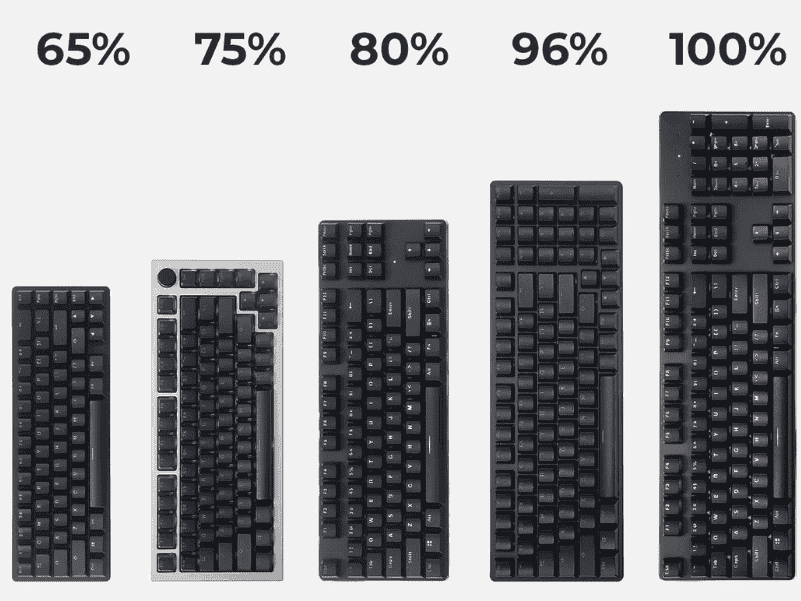
The Ultimate Keyboard Size Guide for Beginners helps you choose the right layout, dimensions, and ergonomics for comfortable, efficient typing and gaming.
Best keyboards for accountants feature reliable number pads, comfortable layouts, and responsive keys for efficient data entry and long work sessions.
Our guide to the best customizable keyboards of 2026 moves beyond lists. Find your perfect match for typing feel, sound, and workflow.
Best gaming keyboards for small hands feature compact layouts, responsive switches, and ergonomic designs for precise control and comfort.