If you’ve ever heard a keyboard that sounds less like a machine and more like a serene natural phenomenon perhaps raindrops gently striking deep mahogany, or smooth marbles dropping onto a thick felt pad you’ve encountered the elusive “thock.” It’s the sound that makes typists close their eyes in satisfaction and has turned the once-humble keyboard into an obsession for audiophiles and gamers alike.
But here is where it gets tricky: if you asked five different keyboard enthusiasts to define “thock,” you might get five different answers. Is it a deep “thump”? A creamy “thwack”? Because “thock” is onomatopoeia a word that mimics a sound its meaning lives somewhere in the ear of the beholder. This subjectivity makes it difficult for beginners to know if they are chasing a real trend or just a figment of the community’s imagination.
In this guide, we are going to cut through the subjectivity. We’ll establish a clear definition of “thock” by breaking down its acoustic signature, comparing it to other sounds like “clicks” and “clacks,” and most importantly, diving into the science of how a keyboard generates that specific noise. By the end, you won’t just know what thock means you’ll know exactly how to build (or buy) a keyboard that delivers it.
The Definition of Thock
At its simplest, “thock” is a low-frequency, deep, and muffled sound produced when a keycap bottoms out. Unlike the sharp, metallic ring of a bell, thock is a dull, rounded sound wave. It feels dense and heavy, almost as if the keyboard is absorbing the impact rather than amplifying it.
To understand it, think about the difference in sound between tapping a hollow plastic pen on a desk (that’s a “clack”) versus clicking the button on a heavy, expensive camera lens (that’s closer to a “thock”). The camera lens sound is solid, quiet, and satisfying because the internal components are dense and well-lubricated. A thocky keyboard aims for that exact acoustic profile.
To truly define thock, we have to look at its three distinct characteristics:
- Frequency (The Pitch): Thock lives in the lower register. It is a bassy sound. If you were to look at it on a spectrogram, the energy would be concentrated in the lower frequencies. This is the opposite of a “clicky” switch, which peaks in the high frequencies to grab your attention.

A visual comparison of sound waves. The sharp, high-frequency spikes of a clicky switch (top) versus the smooth, low-frequency rolls of a thocky switch (bottom).
- Texture (The Feel): The sound implies “smoothness.” A true thock has no rattle, no buzz, and no metallic ping. It is a clean, singular “thump” followed by silence. This is why lubing switches is so critical to achieving thock it removes the high-pitched friction noise.
- Density (The Material): Thock implies mass. You cannot get a deep thock from a cheap, thin plastic keyboard. The sound suggests that the materials involved (the keycaps, the switch, the case) are thick, sturdy, and tightly packed together. It is the sound of quality engineering.
It is also helpful to visualize thock on a spectrum:
In short, if a keyboard sounds like it is wearing a pair of cozy, soundproof slippers, it is probably a thocky keyboard. It is the sound of function meeting comfort, where the noise is a byproduct of deliberate, high-quality design rather than an afterthought.
Thock vs. The Sound Spectrum (What Thock is NOT)

The complete keyboard sound spectrum from sharp clicky switches to creamy smoothness, deep thock, and finally muted silence.
One of the biggest challenges for newcomers to the keyboard hobby is that every sound seems positive at first glance. “Click” sounds satisfying, right? “Clack” feels productive. But in the world of thock, these sounds are actually distinct neighbors and sometimes rivals on the acoustic spectrum.
To truly understand thock, you must first understand what it is not. Let’s walk through the soundscape of a keyboard and identify where thock fits in the lineup.
Imagine you are in a quiet library, and someone clicks a retractable pen repeatedly. That sharp, metallic click-click is designed to grab attention. This is the exact profile of a Clicky switch (like Cherry MX Blues or Kailh Box Whites).
- The Sound: High-pitched, crisp, and intentionally loud.
- The Mechanism: Unlike other switches, clicky switches have a separate internal mechanism (a “click jacket” or “click bar”) that physically creates the noise. The sound is the entire point.
- Why it’s NOT Thock: Thock is deep and absorbs into the ears; click is sharp and pierces through them. Where thock feels like a muffled thump in your chest, click feels like a tap on your eardrum. It is the polar opposite of the quiet, creamy texture thock aims for.
If you have ever worked in a standard office or used a laptop for a long period, you know Clack. It is the default sound of typing. Think of two LEGO bricks being pushed together and then pulled apart repeatedly.
- The Sound: Medium-pitched, plastic-on-plastic, with a slight hollow echo.
- The Mechanism: This usually comes from “plate mount” keyboards or laptops where the keycap travels down and strikes a hard surface (the plate) with nothing to cushion the blow. It is functional, not musical.
- Why it’s NOT Thock: Clack is “thin.” It tells your ears that the keyboard is a tool, not an instrument. Thock, by contrast, sounds “thick.” It implies there is material and padding between your finger and the desk. A clacky keyboard sounds busy; a thocky keyboard sounds purposeful.
If thock has a nemesis, it is Hollow. This is the sound of a keyboard that is acoustically empty. Imagine tapping your fingernail on an empty glass jar versus tapping it on a jar filled with sand. The empty jar rings; the full jar thuds.
- The Sound: Echoey, tinny, and cheap. Often accompanied by a metallic “ping” or spring reverberation.
- The Mechanism: This happens when there is empty space inside the keyboard case. The sound waves bounce around inside the plastic or metal housing before escaping, creating an echo chamber. It is very common in stock, unmodified keyboards.
- Why it’s NOT Thock: Hollow sound implies emptiness. Thock implies density. A hollow keyboard sounds like it is cheaply made; a thocky keyboard sounds like it is over-engineered. When you hear hollow, you want to add foam. When you hear thock, you want to keep typing.
To help visualize where these sounds live in relation to each other, here is a quick reference guide:
By understanding this spectrum, you can start to identify which parts of your current keyboard sound you want to keep, and which parts you need to eliminate to achieve that elusive thock.
The Science of Thock (How it Happens)
Thock is not magic. It is physics. Every material in your keyboard vibrates at specific frequencies, either amplifying sharp noises or absorbing them into deep, satisfying thumps. Here is how the science breaks down.

The acoustic anatomy of a mechanical keyboard. Each layer from keycap to case plays a distinct role in shaping whether you hear thock, clack, or something in between.
Your fingertips meet plastic first, and that plastic dictates everything.
PBT plastic is thick and dense. It has mass, and mass absorbs high frequencies. When you strike a PBT keycap, the material swallows the vibration rather than broadcasting it. This is the foundation of thock.
ABS plastic is thinner and smoother. It vibrates freely like a guitar string, producing a higher-pitched “clack.” It is not wrong it is just different. But if thock is your goal, PBT is your answer.
The plate holds your switches in place, and its material determines how energy travels.
Brass plates are stiff and heavy. They transfer impact directly with no give, resulting in a brighter, more pronounced sound. Think precision, not warmth.
Polycarbonate and FR4 plates flex slightly under pressure. This micro-flex acts as a shock absorber, softening the bottom-out and deepening the sound. Flexibility equals thock.
Your keyboard case is a box where sound bounces before reaching your ears.
Plastic cases often sound hollow because thin walls let sound waves echo endlessly. They amplify emptiness.
Aluminum cases contain sound. The density of metal prevents vibration, creating a controlled environment but it can sometimes add a metallic tinge.
Polycarbonate cases offer the best of both worlds. They are dense enough to absorb echo but soft enough to warm the sound. Many enthusiasts call polycarbonate the “thockiest” case material.
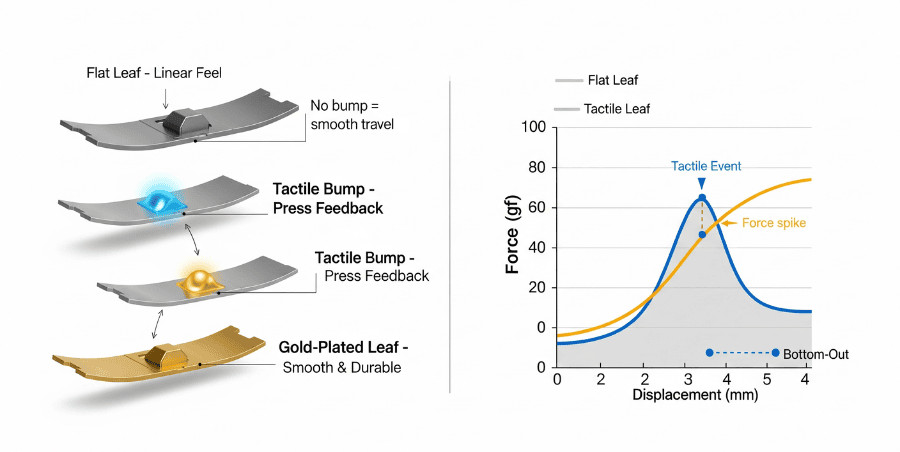
Linear switches rule the thock world. Unlike clicky or tactile switches, they have no internal bumps or clicking mechanisms to introduce high-frequency noise. They move straight up and down, smooth and uninterrupted.
Lubrication is the secret weapon. Dry switches create friction, and friction creates scratchy high notes. Lubricated switches glide, eliminating those sharp frequencies and leaving only a deep, rich bottom-out.
Switches like the Gateron Ink Black V2 have become legends because they combine heavy housings with smooth factory tooling. Lubed properly, they sound like dense marble every time you press.
Here is the truth: no single component creates thock on its own.
You can buy the perfect switches, but if you mount them in a hollow plastic case with thin ABS keycaps, they will sound thin. Conversely, you can build a polycarbonate dream with PBT caps, but dry switches will ruin the magic.
Thock is a system. It is mass absorbing energy. It is flexibility cushioning impact. It is lubrication silencing friction. When every component works together, the science becomes music.
The “Thock” Checklist (How to Achieve It)
You now know what thock is and how it works. Now comes the practical part: making your own keyboard sound that way. Here is a straightforward checklist to get you there.

Applying lubricant to a mechanical keyboard switch to reduce scratchy sound and create a deeper “thock.”
This is the single highest-impact change you can make.
Dry switches have plastic scraping against plastic, creating high-frequency scratchiness that masks deep sounds. Lubrication fills those microscopic gaps, letting components glide silently.
Do this: Buy Krytox 205g0 or Tribosys 3204, a small brush, and a switch opener. Apply a thin even coat to the slider rails and spring ends. The goal is smoothness, not saturation.
Why it matters: Scratchy highs disappear. The bottom-out remains rich and dense.
Hollow echo happens because sound waves bounce inside empty case space. Fill that space, kill the echo.
Do this: Open your keyboard case and add foam between the circuit board and case bottom. You can buy pre-cut case foam, use craft store foam sheets, or even shelf liner. Some builders add a second layer between the plate and circuit board for maximum effect.
Why it matters: Hollow reverberation vanishes. Every keystroke sounds grounded and solid.
Your keycaps control the initial impact sound. Material and thickness determine pitch.
Do this: Look for thick double-shot PBT keycaps. Avoid thin ABS if deep sound is your goal. When in doubt, heavier plastic almost always means deeper sound.
Why it matters: Dense keycaps land with a substantial thud. Thin keycaps ring with higher clacks.
Rattling stabilizers ruin an otherwise perfect soundscape. A loose spacebar cuts through deep tones like static.
Do this: First, apply the “band-aid mod” place a small piece of fabric tape on the circuit board where the stabilizer sits. This cushions contact. Second, lube the stabilizer wire ends with dielectric grease to stop them from clicking against plastic.
Why it matters: Your spacebar and modifier keys will sound as clean and deep as your letter keys. No rattles. No distractions.
If you only have time for two things: lube your switches and add foam. Those two modifications deliver approximately 80% of the thock improvement for minimal cost and effort. The keycaps and stabilizer work take you the rest of the way.
Start there, listen to the difference, and let your ears guide you forward.
Is “Thock” Always Better?
After everything you have read, it would be easy to conclude that thock is the promised land the sound every keyboard should make. But that conclusion would miss the point entirely.

Keyboard sound preference is personal. Some typists love deep thock, while others prefer crisp clack or classic click.
Sound is subjective. Full stop.
Some typists hear thock and feel warmth. Others hear it and feel like they are typing through a pillow. Neither is wrong. They simply hear differently.
Consider the gamer. Hall Effect keyboards are rising in popularity, and they produce a crisp clack rather than a deep thock. Why? Because in competitive gaming, clack cuts through the noise. It provides instant auditory feedback that tells you exactly when a key registers. Thock feels luxurious for essays but can feel vague when split-seconds matter.
Consider the nostalgist. Clicky Blue switches are loud, disruptive, and objectively annoying to everyone in the room. They are also beloved. For many, that click is the sound of falling in love with mechanical keyboards. You cannot replace nostalgia with foam and lubricant.
- Writing alone in a quiet room? Thock might be perfect.
- Gaming where audio cues matter? Clack could serve you better.
- Working near other people? Silent switches might be the respectful choice.
- Chasing that vintage feeling? Click might be exactly right.
Thock is also partially a trend. It sounds incredible through a good microphone in YouTube videos. But what sounds good on camera does not always feel right under your fingers for eight hours.
Thock is a beautiful sound. It represents careful construction and quality materials. But it is one color on a much larger palette. The best keyboard sound is the one that makes you smile when you sit down to type whether that is deep thock, crisp clack, nostalgic click, or silent smoothness.
Conclusion
Thock is more than just a buzzword in the keyboard community. It is a specific acoustic experience deep, dense, and satisfying that emerges when materials work in harmony. Thick PBT keycaps, flexible plates, lubricated switches, and foam-filled cases all contribute to that coveted sound profile.
But as we have explored, thock is not the only destination. The crisp clack of a gaming board, the nostalgic click of Blue switches, and even silent builds all have their place. Sound is personal. Your fingers, your ears, and your use case get the final vote.
Now we want to hear from you. What is your favorite keyboard sound? Are you team thock, team clack, or team click? Let us know in the comments below.
FAQ’s
Not every keyboard has the potential. Low-profile keyboards, laptops, and boards with sealed construction are difficult to modify. However, most standard mechanical keyboards with removable switches and a hollow case can be improved significantly with foam and lubed switches.
No. Silent switches have physical rubber dampeners inside that cushion the bottom-out and return. This makes them quieter than thocky switches, but often at the cost of that satisfying dense “thump.” Silent switches aim for zero noise; thocky switches aim for pleasant noise.
Not at all. Some of the thockiest builds use budget keyboards like the Keychron V series or Royal Kludge boards, combined with $15 foam and $10 lube. Material choices matter more than brand names or price tags.
Thock is deep and muffled like a drum with padding. Clack is higher and crisper like two pieces of plastic tapping together. If you can hear the echo, it is clack. If you feel the thud, it is thock.