

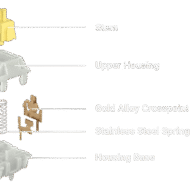
A standard mechanical keyboard switch (left) versus its hidden interior (right). The tiny metal leaf circled in red is the component responsible for tactility, sound, and actuation.
When you think about what makes a mechanical keyboard switch feel the way it does, your mind probably goes straight to the spring. A lighter spring for speed, a heavy spring for resistance. It makes sense. But here’s the secret the hobbyists know: the spring only controls the weight. The true personality of your switch that satisfying bump or that smooth, linear glide is controlled by a tiny, often overlooked piece of metal called the leaf.
You know the difference between a Cherry Red, Brown, and Blue. You can hear the click and feel the bump. But do you know what actually creates that sensation inside the plastic housing? Most people don’t. It’s not magic, and it’s not just the color of the stem.
In this guide, we will dissect the switch leaf, exploring its types, materials, and how it dictates the entire personality of your switch. By the end, you’ll never look at a switch the same way again.
What is a Switch Leaf?

The metal contact leaf and plastic fixed rail work together inside the bottom housing to guide the stem and register keystrokes.
A switch leaf is simply a tiny piece of metal inside your keyboard switch. It’s small, but it does three big jobs that decide how your keyboard feels and works. Think of it as the brains and bones of the switch combined into one tiny part.
1. It Keeps the Key Stable (The Guide)
Imagine sliding a drawer open. If the drawer has no rails, it wobbles and gets stuck. The leaf acts like those rails.
- What happens: When you press a key, the stem (the moving part) slides down against the leaf.
- Why you care: This keeps the key moving straight up and down. No wobble, no sticking. Just smooth pressing.
2. It Tells Your Computer You Pressed a Key (The Brain)
This is the leaf’s most important job. It’s the thing that actually makes the letter show up on your screen.
- What happens: The leaf has a tiny metal arm with a small dot on it (often gold). Inside the switch, there is another metal piece waiting.
- The Magic Moment: When you press the key down, the stem pushes that arm. The gold dot touches the other metal piece. This creates a connection, and your computer says, “Got it! Type that letter.”
- Why you care: If this doesn’t happen, your key does nothing. The better the metal (like gold), the longer your switch lasts sometimes 50 million or even 100 million presses.
3. It Creates the “Feel” (The Personality)
Ever wonder why some switches feel smooth, some have a bump, and some go click? That’s the leaf’s shape at work.
- What happens: The stem rubs against the leaf on every press. The shape of the leaf changes how that rub feels.
- The Different Feels:
- Smooth feel (Linear): The leaf is flat. The stem slides down with nothing in its way. No bump, no click. Just straight down and up. (Example: Red switches)
- Bumpy feel (Tactile): The leaf has a little hill or bump. The stem has to push over that bump. You feel a small bump under your finger, then it drops. (Example: Brown switches)
- Click feel (Clicky): The leaf has a separate tiny piece of metal that actually snaps. When you press, it bends and snaps back, making that satisfying click sound. (Example: Blue switches)
The leaf lives inside the bottom half of the switch the colored plastic part that sits on your keyboard’s metal plate.
You cannot see it when the switch is closed. You only feel it when you type. But if you ever open up a switch (hobbyists call this “opening” or “dissecting”), the leaf is the first metal thing you’ll spot standing up inside the plastic base.
A Simple Way to Remember It
Think of a roller coaster car (the stem) going down a track (the switch).
- The spring is the push you feel.
- The leaf is the track itself.
- It keeps the car from flying off (stability).
- It tells the operator the car reached the end (electrical signal).
- If the track has a bump, you feel it in your stomach (tactility).
The Anatomy of the Leaf
Now that you know what a leaf does, let’s open it up and look at its different parts. A switch leaf isn’t just one simple piece of metal it has specific sections designed for specific jobs.
The contact pad is the most important part of the leaf. It’s the exact spot where the electrical connection happens.
- What it looks like: A small round dot on the side of the leaf. It is often gold-plated.
- What it does: When you press the key, the stem pushes the leaf until this pad touches another contact inside the switch. That touch completes the circuit and tells your computer, “Hey, I pressed this key.”
- Why gold? Gold does not rust or wear down easily. This ensures the connection works reliably for millions of presses. Cheap switches skip the gold, which is why they often fail faster.
Simple Analogy: Think of the contact pad like the tip of a charging cable. It needs to be clean and made of good material to work every time you plug it in.
The leaf arm is the long, curved piece of metal that actually moves. This is the part that gives the leaf its springy behavior.
- What it looks like: A thin, bent metal strip extending from the base of the leaf.
- What it does: The arm creates tension against the stem. As the stem slides down, it pushes against this arm. The arm bends slightly, then springs back when you release the key.
- Why shape matters: The curve of the arm determines how much resistance you feel. A tighter curve means more tension (harder press). A looser curve means less tension (easier press). The bump you feel in a tactile switch? That’s the arm’s shape working against the stem.
Simple Analogy: The leaf arm is like a diving board. It bends when you stand on it, and springs back when you jump off. The thicker or more curved the board, the more resistance you feel.
This is a newer feature found mostly in high-end, premium switches. Regular switches don’t have this.

Standard leaf (left) vs dampened leaf (right). The coating on the dampened leaf reduces metallic “ping” for a deeper, cleaner sound.
- What it is: A thin coating or small pad attached to the leaf arm.
- What it does: When metal rubs against plastic or other metal, it can sometimes create a high-pitched ringing sound. Enthusiasts call this “leaf ping.” It’s that annoying metallic echo you might hear in cheaper boards.
- The fix: Manufacturers add a tiny bit of damping material (like a soft coating or a small foam pad) to the leaf. This absorbs the vibration before it turns into noise.
- Examples: Switches like the Durock or some custom lubed switches often feature dampened leaves for a quieter, deeper sound profile.
Simple Analogy: Wrap a metal spoon in a thin cloth and tap it on a table. The sound is dull and quiet, right? That’s damping. Without the cloth, it pings. Damping material does the same thing inside your switch.
Types of Leaves and Their Behavior
The shape of the leaf is the single biggest factor that decides your switch feel. Here is how it works.

Three leaf designs side by side. Linear (left) has a smooth curve. Tactile (middle) has a visible bump. Clicky (right) uses two separate pieces of metal that snap together.
Linear leaves have a smooth curve with no bumps or hills. When you press the key, the stem slides against this leaf with zero resistance changes. The pressure feels exactly the same from the moment you start pressing to the moment you hit the bottom. Cherry Red and Gateron Yellow are popular examples. These are best for gamers and anyone who wants the smoothest possible typing experience.
Linear leaves have a smooth curve with no bumps or hills. When you press the key, the stem slides against this leaf with zero resistance changes. The pressure feels exactly the same from the moment you start pressing to the moment you hit the bottom. Cherry Red and Gateron Yellow are popular examples. These are best for gamers and anyone who wants the smoothest possible typing experience.
Tactile leaves have a small bump or protrusion on their surface. As the stem slides down, it hits this bump. Your finger feels resistance. You push harder, and the stem finally pushes past the bump and continues down. That moment of push-past is the tactile bump you feel under your finger. Cherry Brown and Holy Panda are classic examples. These are best for typists who want feedback without noise.
Clicky leaves use a two-piece metal system. There is the main leaf arm plus a separate, thinner piece of metal attached to it. When you press the stem down, this smaller piece resists at first, then suddenly buckles and snaps downward. That snap creates the audible click sound and a sharp tactile bump at the same time. Cherry Blue and Kailh Box White are popular examples. These are best for people who love loud typing feedback.
Linear leaves are smooth curves with no bump. Tactile leaves have a bump that you push past. Clicky leaves use two pieces of metal that snap together to create click and bump at the same time.
Materials Matter: Copper vs. Beryllium
The metal used to make the leaf changes how your switch feels, sounds, and lasts. Here is what you need to know.
Most switches use copper alloy leaves. It is a mix of copper with metals like tin or zinc.
Why it works:
- Conducts electricity well for reliable keystrokes
- Affordable to produce
- Easy to shape into precise leaf designs
The downside: Over millions of presses, copper alloy can slowly lose tension. The metal may deform slightly, making the switch feel softer or less crisp after heavy use.
Bottom line: Perfectly fine for most users. Budget and mid-range switches use this.
Beryllium copper mixes copper with a small amount of beryllium. This is found in high-end custom switches.
Why it is better:
- Excellent elasticity springs back to shape every time
- Maintains tension for 100 million presses or more
- Resists bending and deforming
The downside: It costs more. Switches with beryllium copper leaves are priced higher.Bottom line: If you want switches that feel the same years later, look for this.

Left: Standard copper alloy leaf. Right: Premium beryllium copper leaf. Harder metals last longer but may need damping to reduce metallic ping.
Harder metals like beryllium copper last longer but come with an acoustic trade-off.
What is leaf ping? That high-pitched metallic ringing sound you sometimes hear after a keystroke. It sounds like a tiny “ding” or “sprong.”
Why it happens: When the stem hits the leaf or the leaf springs back, the metal vibrates. Softer metals absorb vibration. Harder metals resonate more they hold the vibration and release it as sound.The fix: Premium switches often add damping coatings or pads to stop the ping while keeping the durability. Lubing the leaf contact points also helps.
- Copper alloy: Great for budget builds and beginners
- Beryllium copper: Worth it for long-term builds and enthusiasts
- Ping sensitive? Look for dampened leaves or plan to lube your switches
The Sound of the Leaf
The leaf affects not just feel but sound too. Here are the two most common noise issues and how to fix them.
What it is: A high-pitched “sprong” or “ding” right after you bottom out a key. Like a tiny bell ringing inside your switch.
What causes it: When you release a key, the leaf snaps back to position. That sudden movement creates vibration. If nothing absorbs it, you hear that vibration as ping.
When it happens: Harder metals like beryllium copper tend to resonate more. Unlubed switches also ping more because there is no damping layer.
What it is: A rough, sandpaper-like feeling when you press slowly. Sometimes you can hear a faint “grind” as the key moves.
What causes it: The leaf rubs against the stem rail on every press. If that contact point is dry or rough, you feel and hear friction. Think dry skin rubbing versus lotioned skin.
When it happens: Stock switches with no factory lube. Cheaper switches with rougher metal finishes. Dry contact points.
Good news. Both issues go away with lube.
How lube helps ping: It adds a thin layer that absorbs vibration. When the leaf snaps back, the lube catches it softly. No vibration, no ring.
How lube helps scratchiness: It fills the tiny gaps between leaf and stem. Metal glides on smooth film instead of grinding. The gritty feel disappears.
What gets lubed: The leaf arm where it touches the stem. The contact points. Sometimes the whole leaf.
Quick teaser: Lubed switches sound deep, creamy, and premium. We will cover how to do this step by step in a separate guide.

A lubing station with a disassembled switch. The bottom housing (where the leaf sits) is ready for lubrication. Krytox 205g0 and a fine brush are the standard tools for eliminating ping and scratchiness.
A dry switch will ping and scratch no matter how good the materials are. Lube unlocks the leaf’s true potential.
Common Problems & The Leaf Bend
Leaves are precise metal pieces. But because they are thin, they can bend. Here is what happens and what you can do about it.
It does not take much. A leaf can bend during shipping if packaging is loose and boxes get thrown around. It can bend from aggressive typing over many months. And it can bend during assembly if you push switches too hard into a plate or yank them out carelessly.
A bent leaf announces itself clearly.

Left: Healthy leaf. Right: Bent leaf with misaligned arm. This switch will feel mushy or fail entirely.
Dead key: You press and nothing happens. The leaf is bent so far that the contact pad never touches the other contact inside. The circuit never completes.
Mushy feel: The leaf bends just a little. Not enough to kill the key, but enough to ruin the feel. The crisp bump turns into a vague, spongy mess. Typing feels wrong.
Inconsistent typing: The key works sometimes but not always. Or it double types. Or it triggers too early. A bent leaf messes with the contact point.
Short answer: Yes, but it is risky.
How it is done:
Open the switch. Find the leaf inside the bottom housing. Look for the bend. Use tweezers to gently push the leaf back to its original shape. Close the switch and test.
The risk:
One wrong move and the leaf snaps. Then the switch is truly dead. Too much force and you make it worse. This is delicate surgery.
Ask yourself three questions:
- Is it a cheap switch? Throw it away and replace it. Not worth the hassle.
- Is it rare or expensive? Try the tweezers fix, but accept you might lose it.
- Do you have spares? Just replace it. Life is too short to fight a bent leaf.
Prevention is best: Buy from trusted vendors. Handle switches gently. If a switch feels wrong right away, do not force it. Return or replace it.
A bent leaf is not a broken switch. The plastic housing and stem are usually fine. The metal just needs to go back where it belongs. But because metal is unforgiving, fixing it is always a gamble.
Conclusion
By now you know the truth. The spring gets all the attention, but the leaf is the real star inside your switch.
It guides the stem. It completes the circuit. It shapes the feel under your fingers. Whether you like smooth linear presses, satisfying tactile bumps, or loud clicky feedback, the leaf is what makes it happen. The materials it is made from decide how long it lasts and how it sounds. And when things go wrong ping, scratchiness, or a bent leaf you now know why and what to do about it.
Next time you shop for switches, do not just look at the spring weight or the color. Look deeper. Ask what leaf design it uses. Ask what material it is made from. That tiny piece of metal hidden inside the housing is what you are actually interacting with every single time you press a key.
The spring pushes back. But the leaf? The leaf decides the personality.
You made it to the end. That means you care about the details. So here is a question for you:
Have you ever experienced “leaf ping” in your build? Did you fix it with lube or just live with it?
Drop your answer in the comments below. Your experience might help someone else dealing with the same issue. And if you have a bent leaf story, we definitely want to hear that too.
Happy typing. And next time someone asks why your keyboard feels so good, you can tell them exactly why. It is all in the leaf.

I love what you guys are usually up too. This type of clever work and reporting! Keep up the awesome works guys I’ve incorporated you guys to our blogroll.